AI in SOLIDWORKS: What’s New in FD03

BLOG

AI in SOLIDWORKS: What’s New in FD03

[techtips_featured_image_shortcode]

SOLIDWORKS AI in FD03: Meet LEO, Your New Engineering Assistant

Artificial Intelligence in SOLIDWORKS continues to evolve at an impressive pace. While FD02 introduced several AI-powered tools, FD03 changes the experience entirely by making AI conversational.

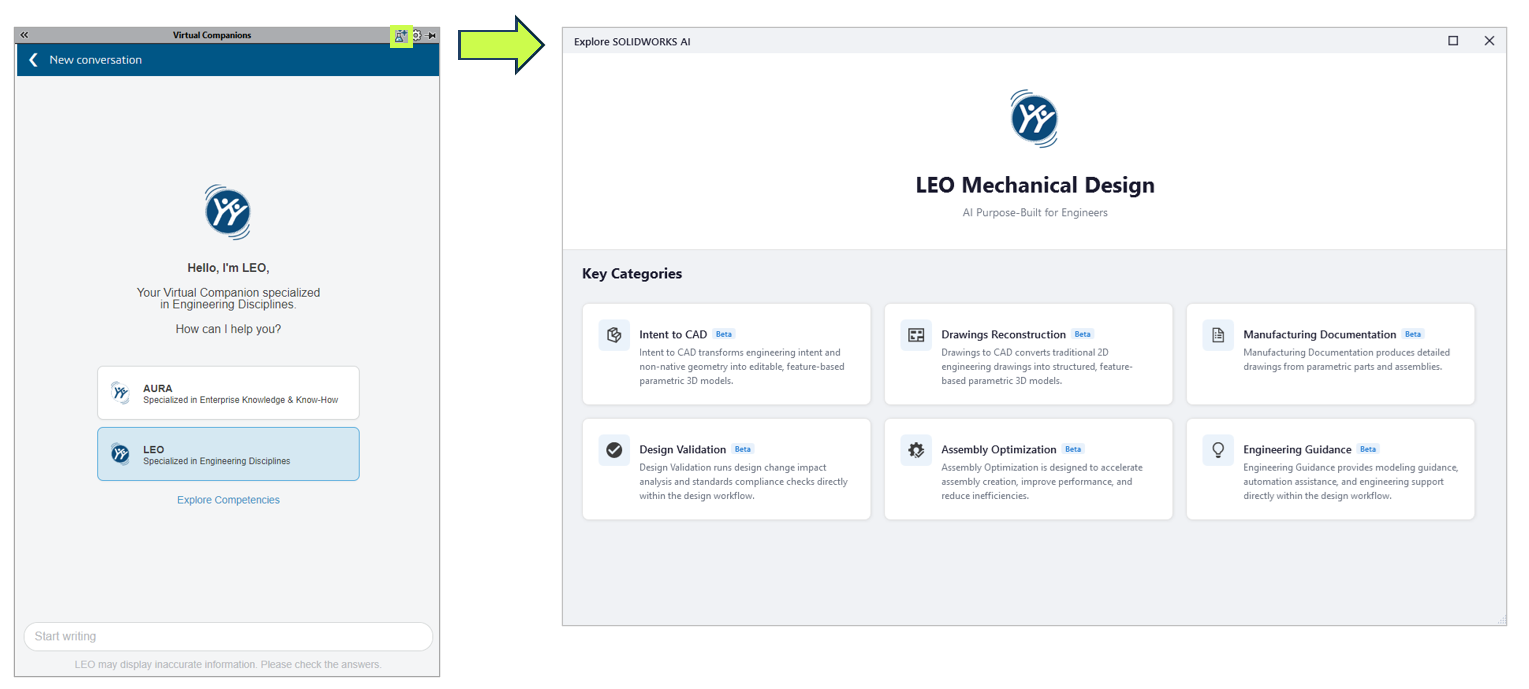
Instead of opening separate commands or navigating multiple PropertyManagers, many of SOLIDWORKS’ newest AI capabilities are now accessed through LEO, the new SOLIDWORKS AI Virtual Companion.
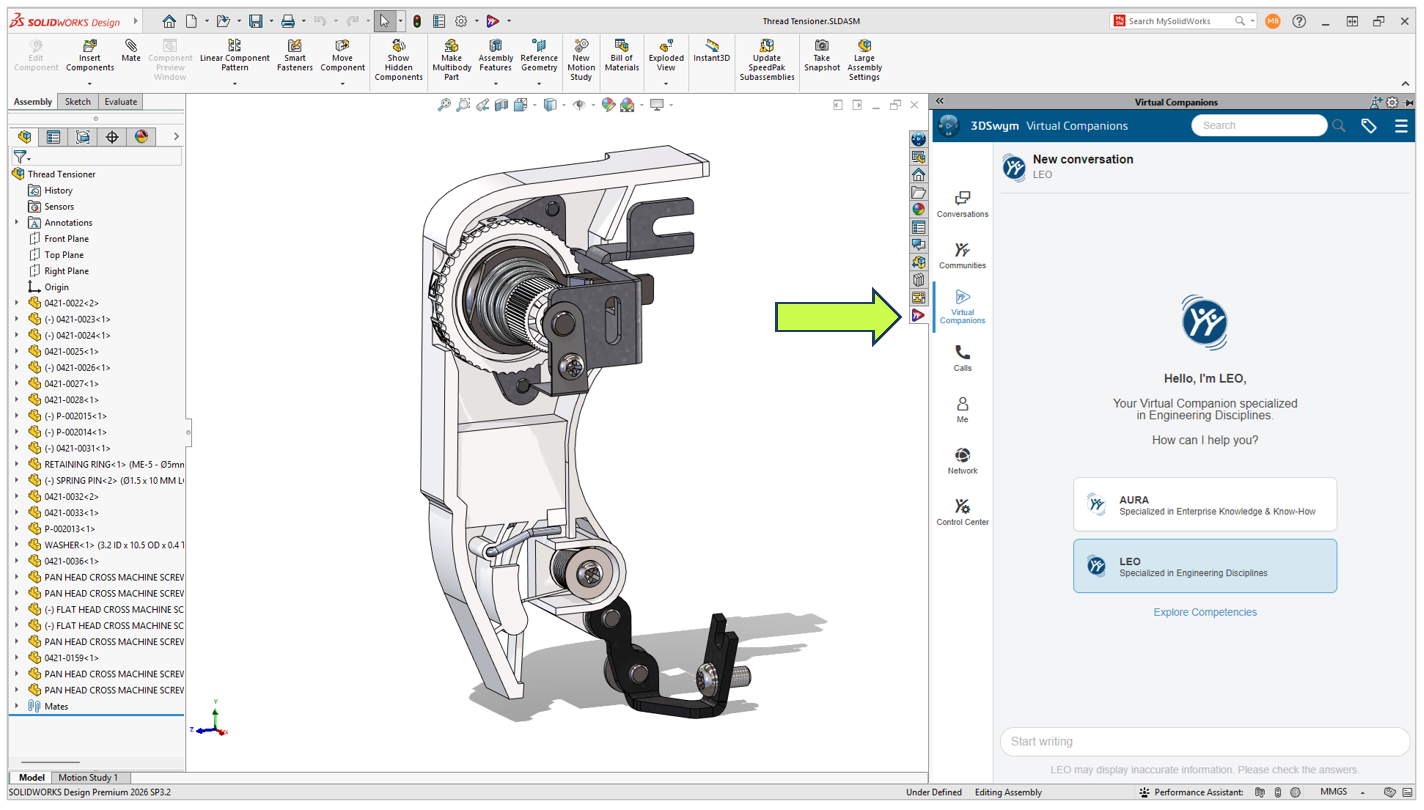
Meet LEO

Think of LEO as an engineering assistant built directly into SOLIDWORKS. Rather than replacing engineers or making design decisions for you, it helps automate repetitive tasks, answer technical questions, and simplify complex workflows using natural language.

Let’s take a look at everything that’s new in SOLIDWORKS FD03.

LEO Is Becoming the New Way to Work in SOLIDWORKS

One trend immediately stands out in FD03.

Rather than adding another collection of disconnected AI tools, Dassault Systèmes is building a single conversational interface that ties everything together.

Need to generate a macro?

Ask LEO.

Need to simplify an assembly?

Ask LEO.

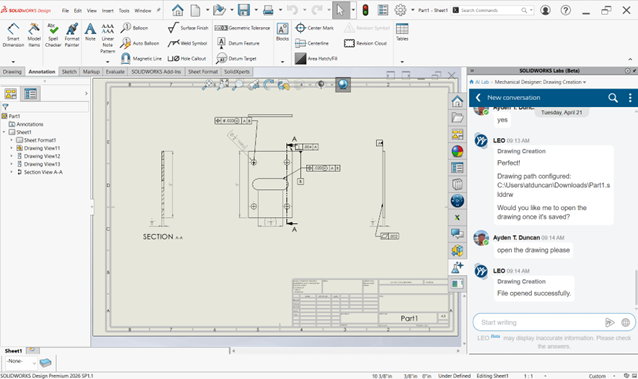
Need to create a drawing?

Ask LEO.
Ask LEO.

Instead of memorizing commands or digging through menus, you’re increasingly able to describe what you want using plain language.

This isn’t about replacing engineering expertise. It’s about reducing the number of clicks between an idea and the result.

Smarter CAD Editing with Intent to CAD

One of the biggest improvements in FD03 is the continued evolution of Intent to CAD.

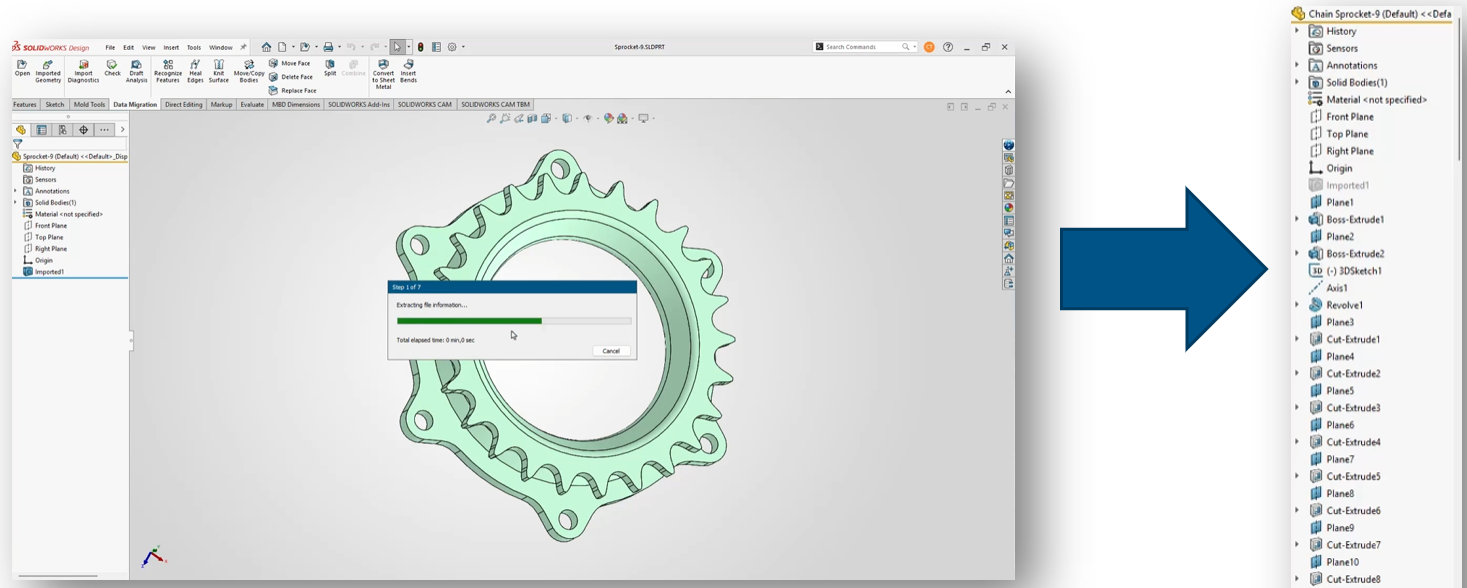
The BREP to Parametric CAD capability introduced in FD02 is now integrated directly into LEO.

Imported STEP and IGES files are often nothing more than non-parametric geometry, making them difficult to modify without manually rebuilding features.

Now, simply ask LEO to convert imported geometry into an editable feature-based SOLIDWORKS model.

This is particularly useful for:

  • Reverse engineering projects

  • Supplier CAD

  • Customer-supplied models

  • Legacy CAD data

Instead of rebuilding models from scratch, engineers can begin making design changes almost immediately.
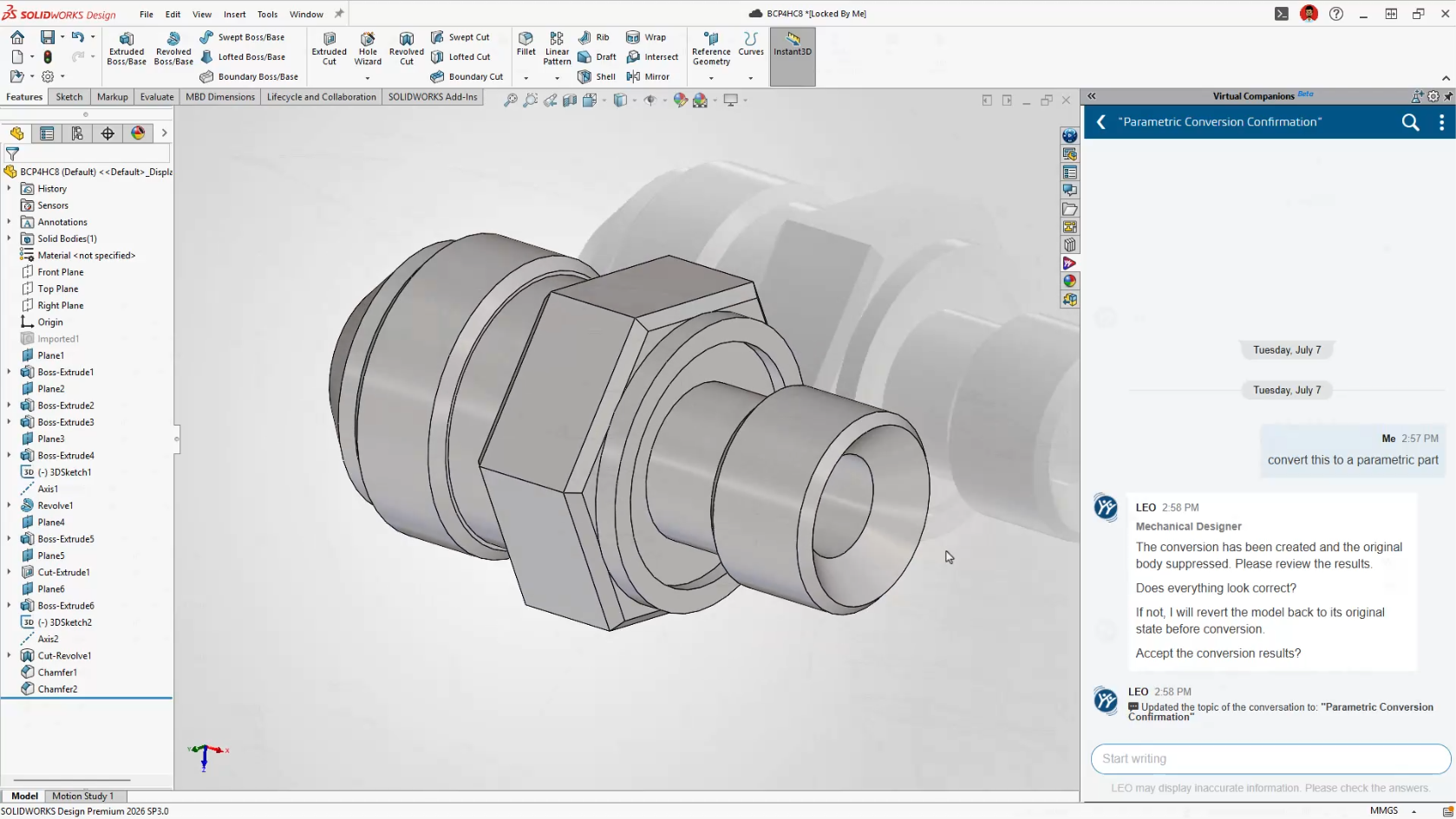
Smarter CAD Editing with Intent to CAD

Engineering Guidance Gets Much Smarter

FD03 dramatically expands the number of engineering tasks LEO can assist with.

Rather than acting like a search tool, LEO now becomes an active design assistant throughout the modeling process.

Generate SOLIDWORKS Macros

Automation has traditionally required knowledge of VBA programming.

Now you simply describe the task you’d like to automate.

Examples include:

  • Rename every configuration

  • Export every drawing sheet as a PDF

  • Rename selected files

  • Batch update custom properties

LEO generates the VBA macro automatically and opens it directly in the editor, where you remain in complete control before running it.

For many users, this will be their first practical introduction to SOLIDWORKS automation.
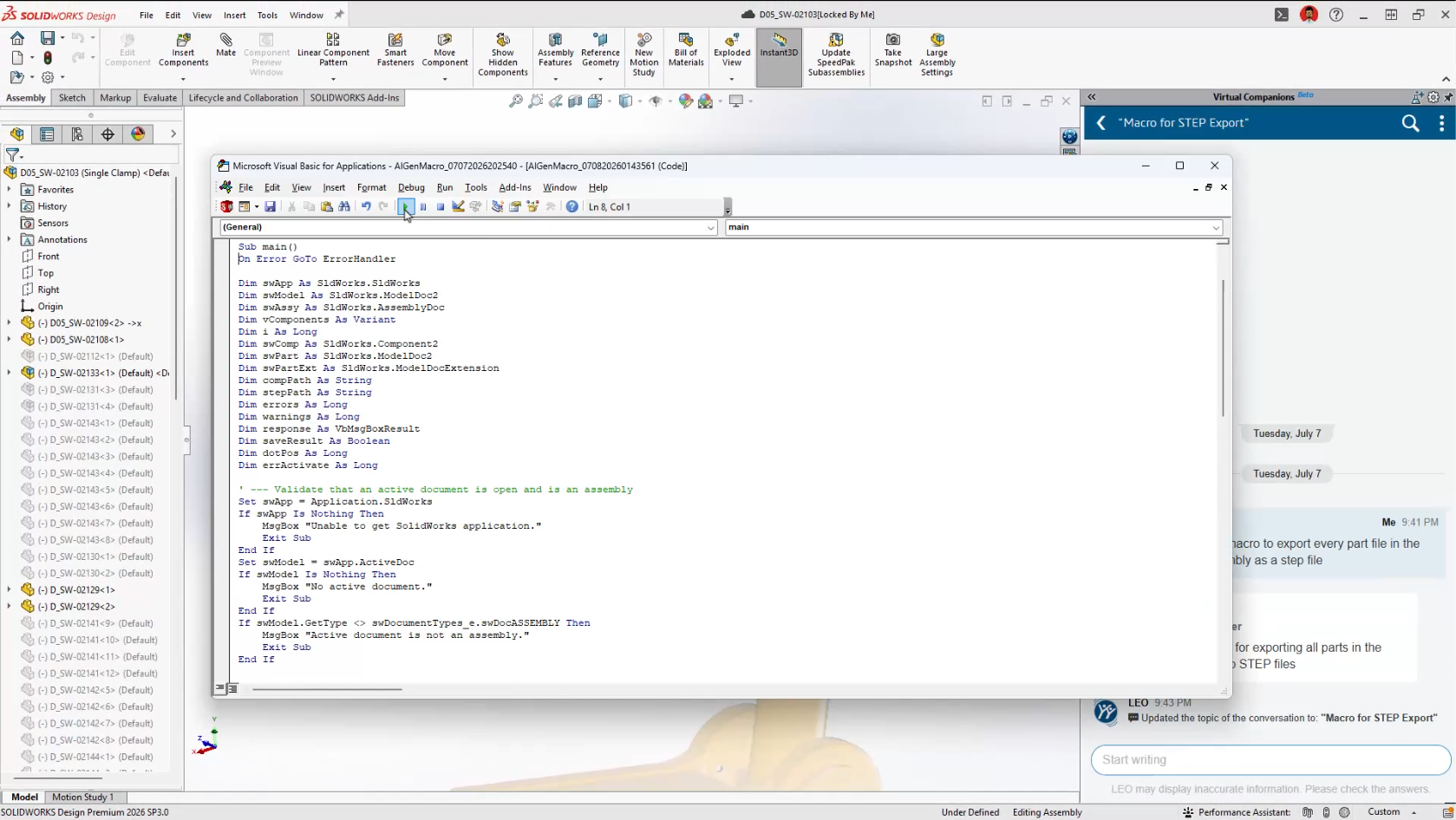
Generate SOLIDWORKS Macros

Surface Area Reports

Need to know how much paint or coating a model requires?

Rather than manually measuring geometry, LEO can calculate:

  • Entire part surface area

  • Selected bodies

  • Individual faces

  • Face groups by colour

It’s a small feature that could save a surprising amount of time in manufacturing workflows.
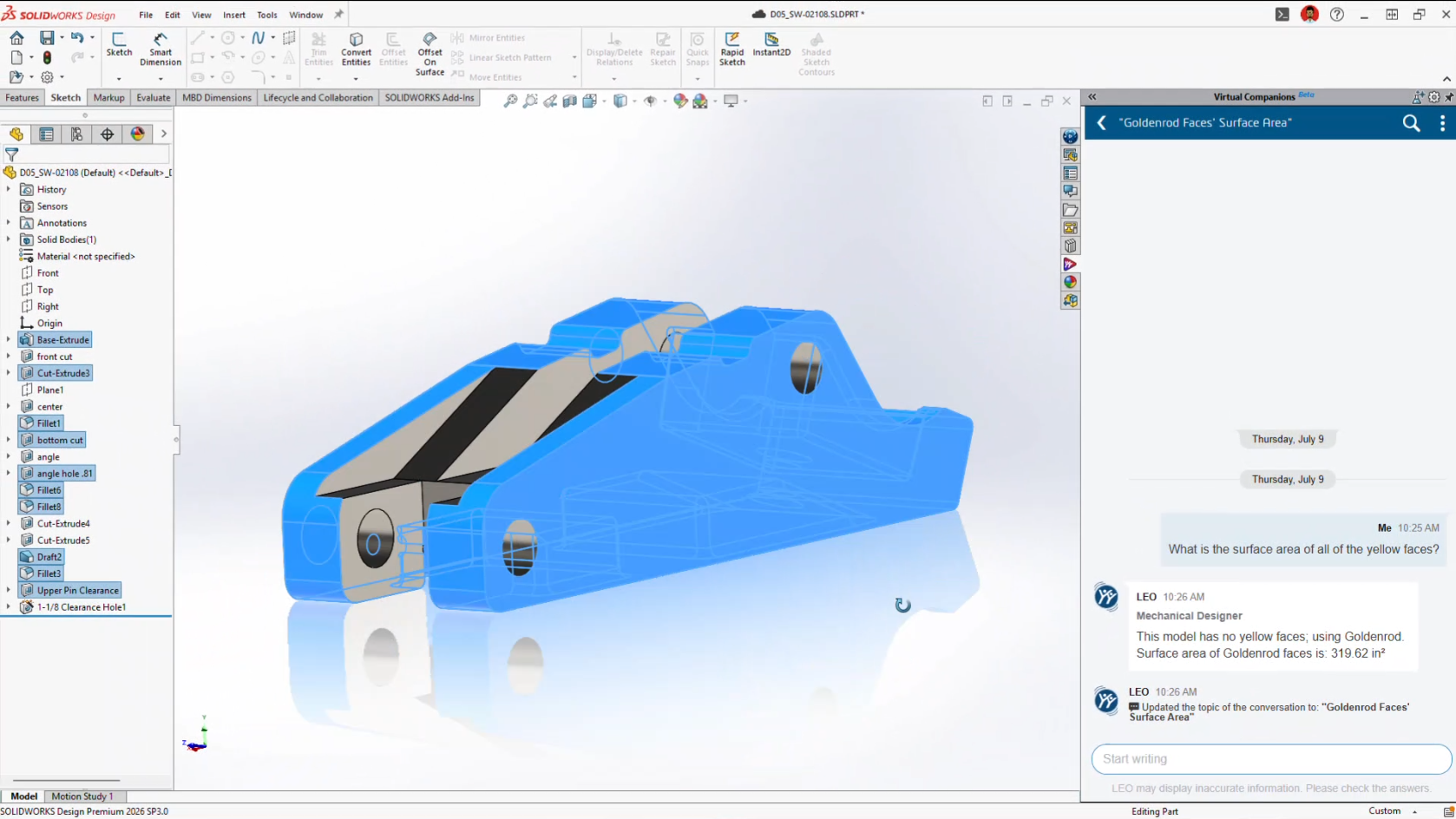
Surface Area Reports

Scale Assist

Scaling parts has always been possible.

Scaling them while keeping dimensions meaningful has been another story.

Scale Assist regenerates dimensions after resizing so drawings continue reflecting the actual model dimensions instead of scaled values.

It’s particularly useful when adapting existing designs into different product sizes.

Natural Language Selection

Anyone who’s spent time selecting dozens, or hundreds, of faces knows how tedious it can become.

Now you can simply tell LEO what you need.

Examples include:

Select every red face.

Select all visible sheet metal bodies.

Select all cylindrical faces.

Less clicking.

Fewer mistakes.

Faster workflows.

Material Appearance Manager

Introduced in FD02 and expanded in FD03, Material Appearance Manager now works through conversational prompts.

Instead of manually editing appearances one feature at a time, LEO can identify, highlight and update materials throughout assemblies while maintaining visual consistency.
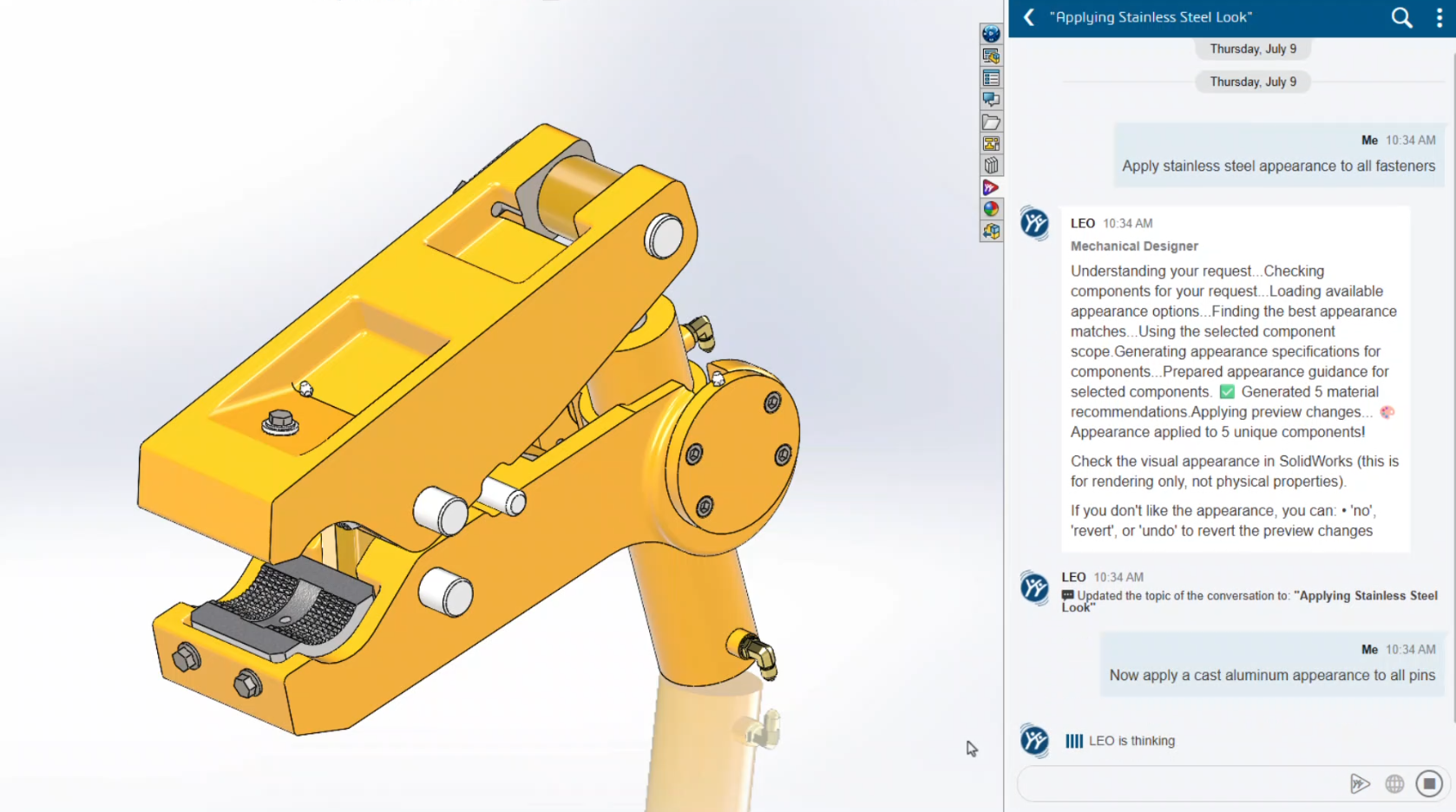
Material Appearance Manager

Equation Assistant

Writing equations inside SOLIDWORKS has never been difficult, but remembering the correct syntax certainly can be.

Equation Assistant allows engineers to describe the relationship they want.

LEO creates the equation, validates the syntax and even helps troubleshoot errors before they’re applied.
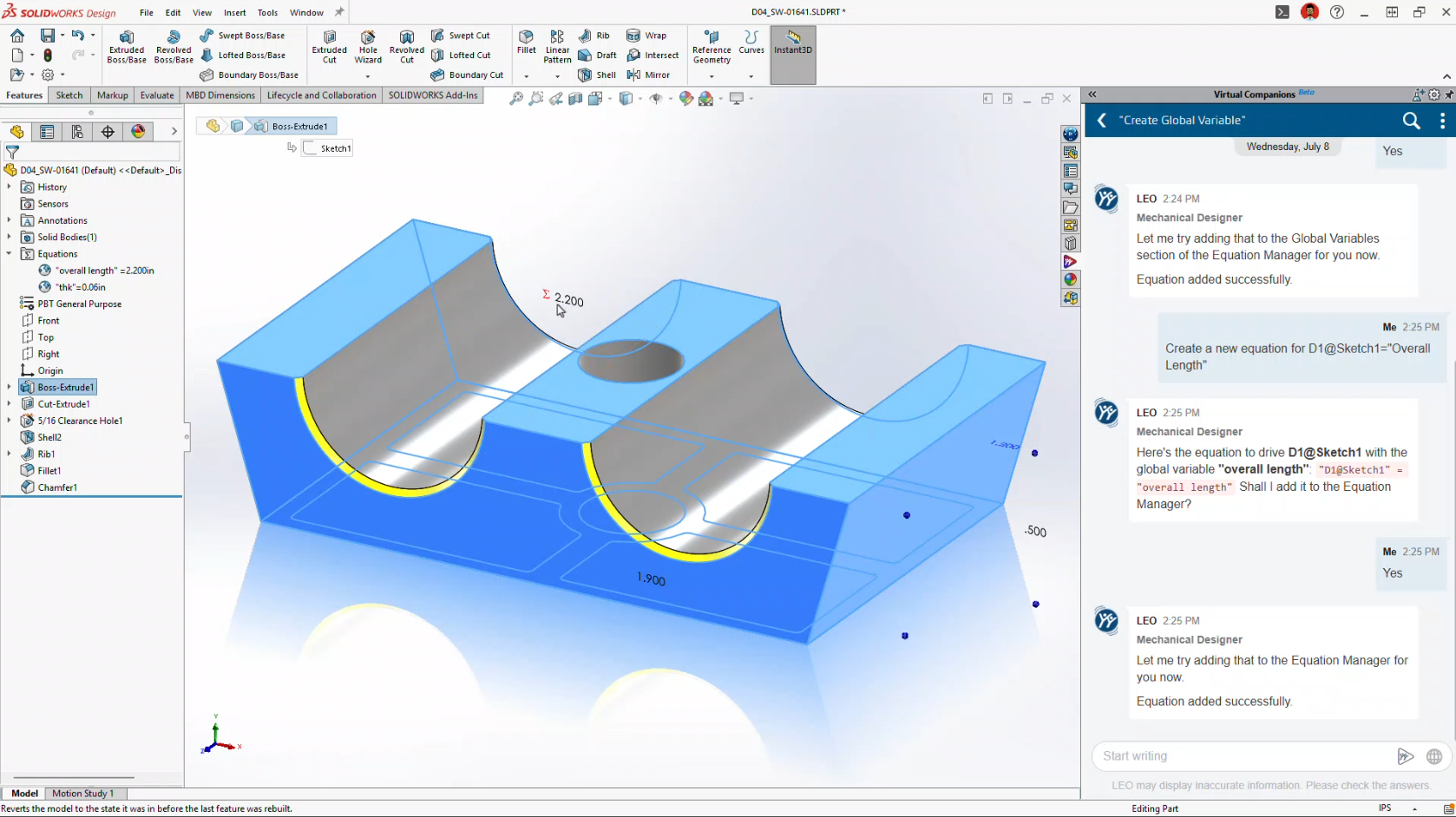
Equation Assistant

Expert SOLIDWORKS Guidance

Perhaps one of the most underrated additions is Expert Guidance.

Instead of searching the Help documentation or the internet, LEO provides modelling recommendations based on SOLIDWORKS best practices directly inside your workflow.

For newer users, it’s almost like having a CSWA-level mentor available whenever you need one.
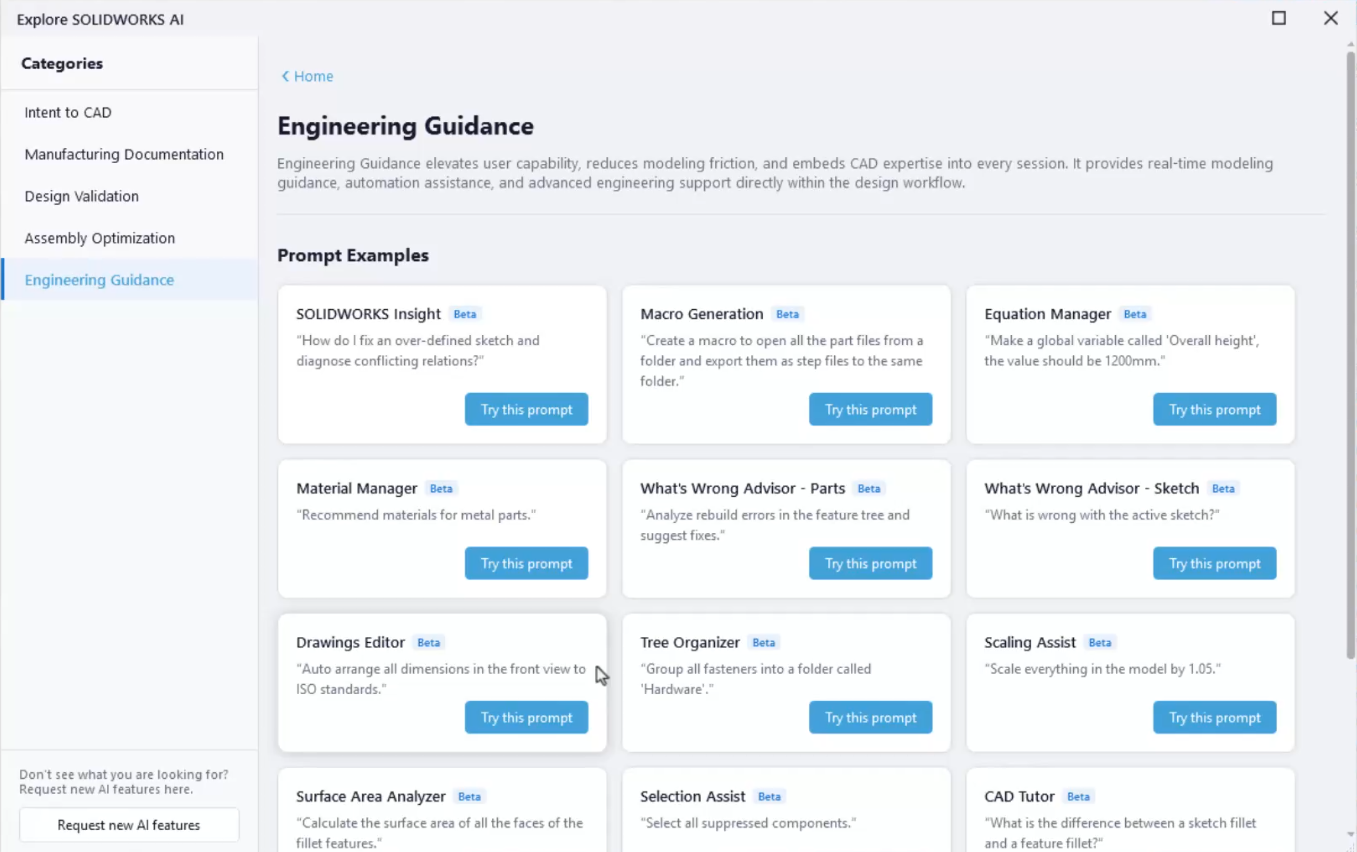
Expert SOLIDWORKS Guidance

AI Makes Drawing Creation Even Easier

Drawing automation continues to improve significantly.

FD02 introduced Auto-Generate Drawings.

FD03 transforms it into a conversational workflow.

Instead of navigating dozens of PropertyManagers, you simply tell LEO what you want.

LEO can now:

  • Create drawing views

  • Change view scales

  • Position views

  • Rotate views

  • Adjust line weights

  • Insert annotations

  • Generate flat patterns

  • Create bend tables

  • Export DXF

  • Export PDF

The goal isn’t to replace engineering review.

It’s to eliminate the repetitive setup work that consumes so much time.
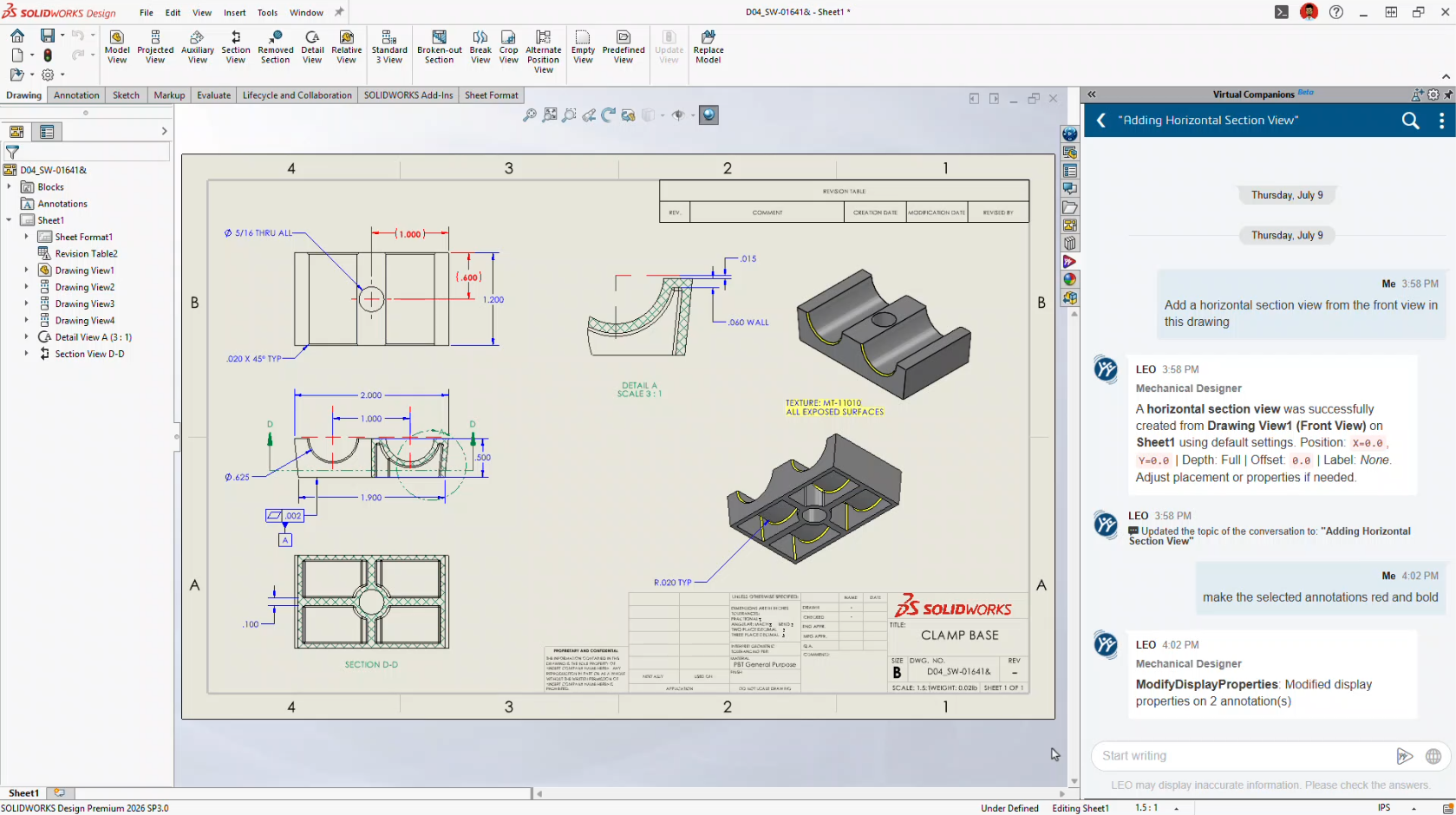
AI Makes Drawing Creation Even Easier

Automatic Assembly Instructions

Another brand-new capability is Assembly Instruction Generation.

Using your existing CAD data, LEO can automatically generate step-by-step assembly instructions complete with visual snapshots.

Potential applications include:

  • Manufacturing work instructions

  • Service documentation

  • Training manuals

  • Assembly guides

Documentation has traditionally been one of the least enjoyable parts of engineering.

This feature could dramatically reduce that workload.
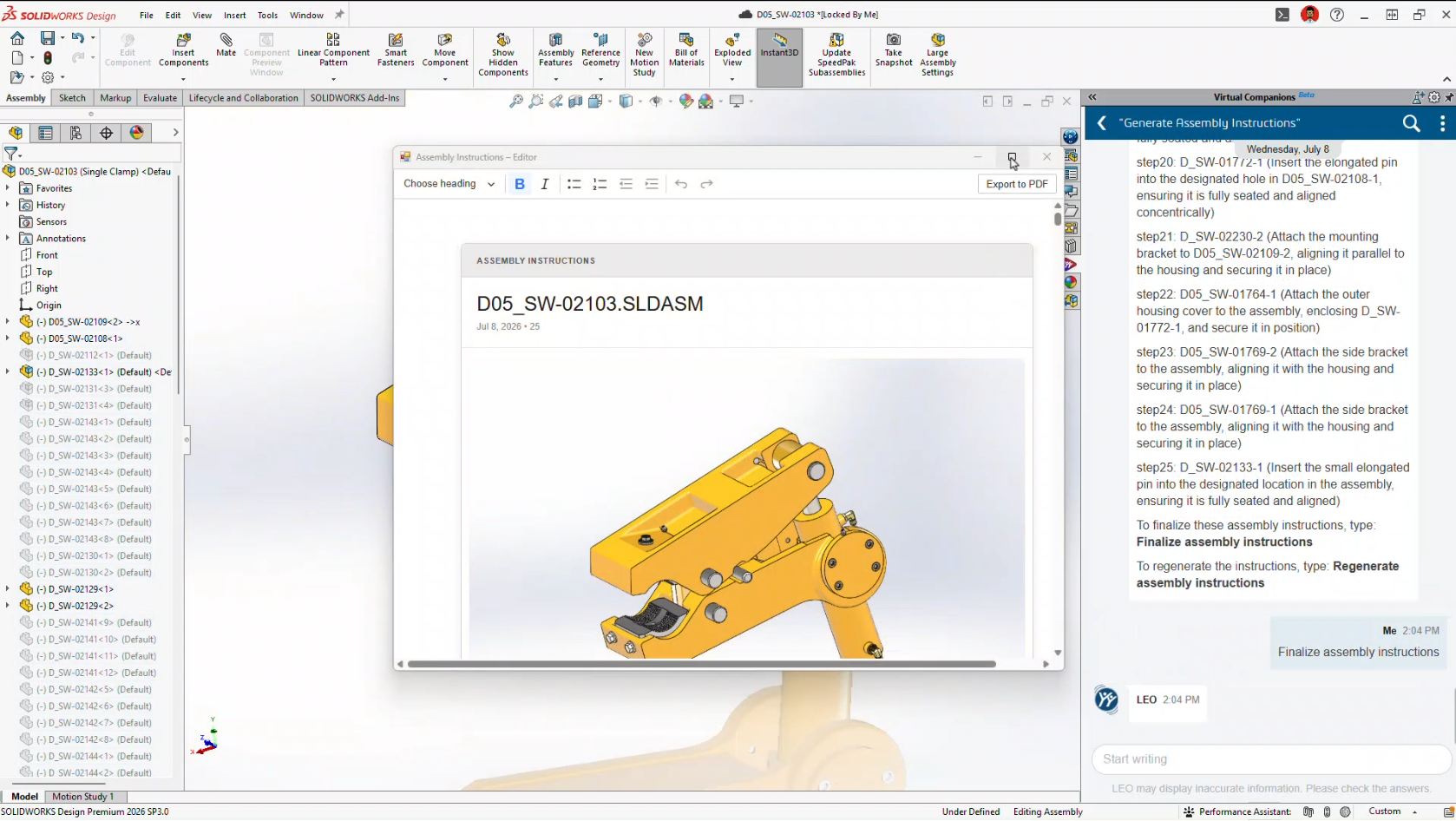
Automatic Assembly Instructions

Smarter Large Assembly Management

FD03 also builds on the Assembly Performance improvements introduced in FD02.

Instead of simply identifying performance issues, LEO can now actively recommend solutions.

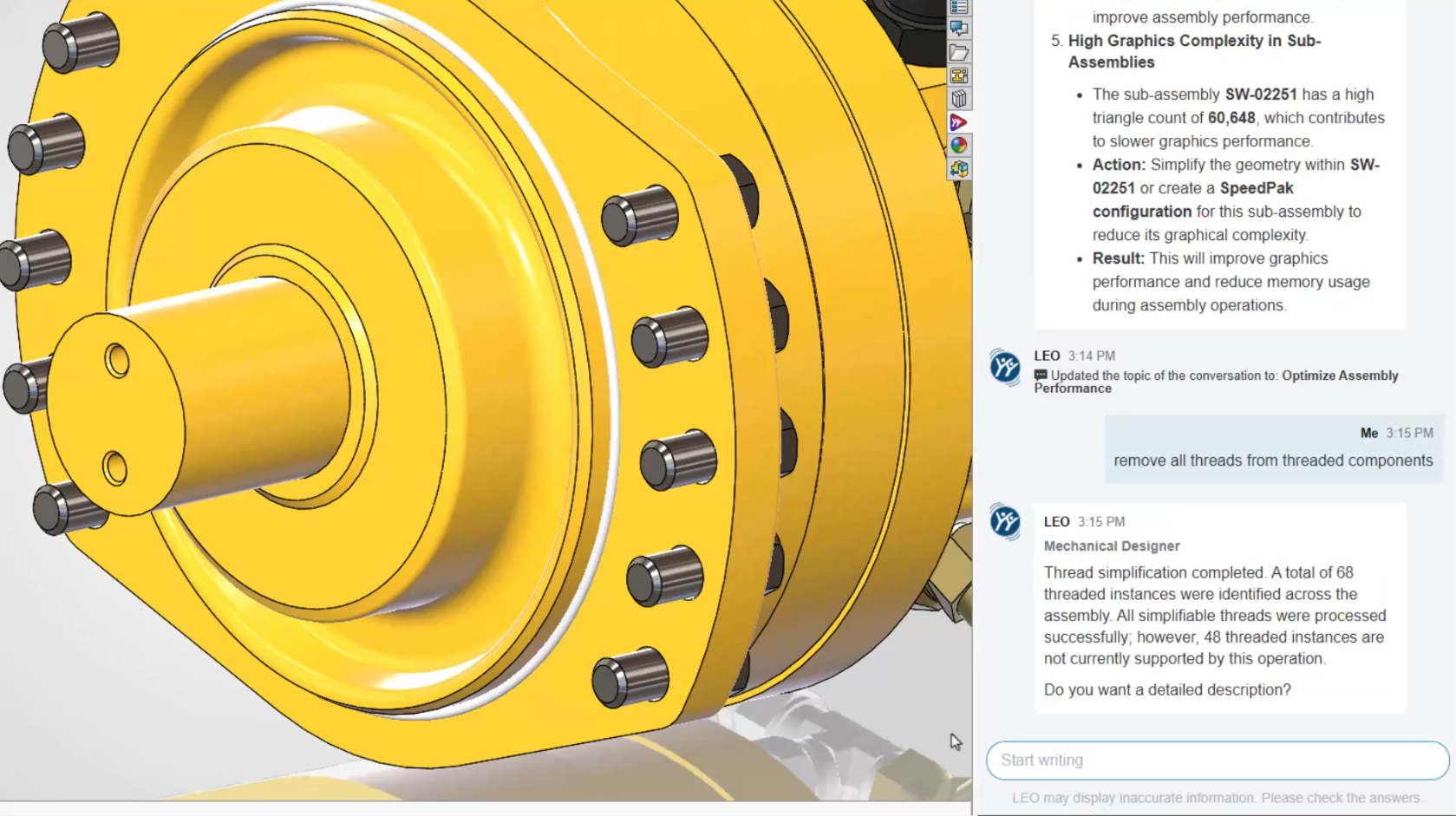
Thread Simplification

Modeled threads consume significant system resources.

LEO can identify imported fasteners with modeled threads and convert them into cosmetic threads while preserving drawing representation.

The result is smaller files and noticeably faster assembly performance.
Thread Simplification

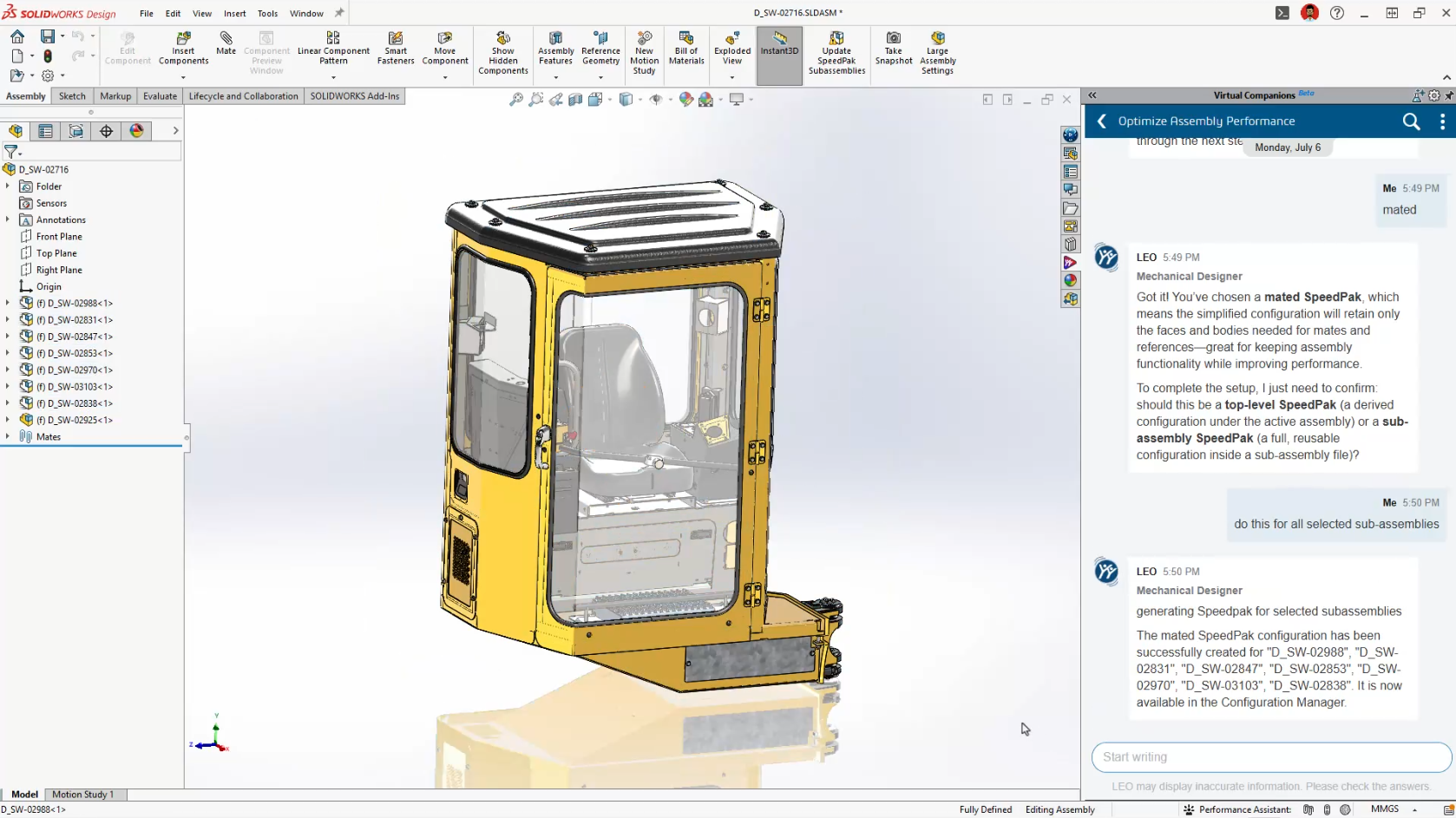
AI-Guided SpeedPak Creation

SpeedPak has always been one of SOLIDWORKS’ most powerful large assembly tools.

Many users simply aren’t sure when, or how, to use it effectively.

LEO now recommends appropriate SpeedPak strategies based on your assembly structure and automatically generates them for you.

For companies working with large assemblies every day, this could become one of the most valuable additions in FD03.
AI-Guided SpeedPak Creation

PLM Information Without Leaving SOLIDWORKS

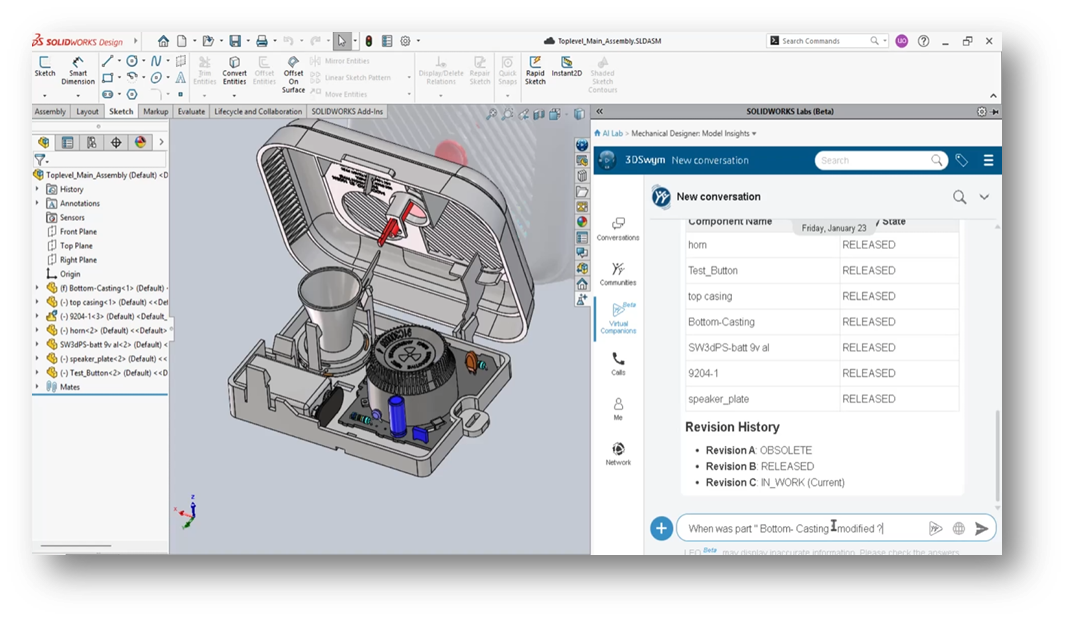
For customers using Cloud Services or the 3DEXPERIENCE platform, LEO continues to bridge the gap between CAD and PLM.

Rather than navigating multiple dashboards, you can simply ask questions like:

  • Who owns this file?

  • What revision is it?

  • Are there pending approvals?

  • What configurations exist?

  • Are there open change actions?

It’s another example of AI reducing navigation while making information easier to access.

What FD03 Means for SOLIDWORKS Users

If FD02 introduced AI-powered tools, FD03 introduces an AI-powered workflow.

LEO is gradually becoming the central interface for interacting with SOLIDWORKS, allowing engineers to work more naturally using conversation instead of commands.

More importantly, SOLIDWORKS continues to take a practical approach to AI.

None of these features attempt to replace engineers.

Instead, they focus on reducing repetitive work, improving productivity, and helping users get more value from SOLIDWORKS without changing the way they already design.

That’s exactly where AI delivers the greatest benefit.

Ready to Explore SOLIDWORKS AI?

Many of the features introduced in FD03 are available as part of the latest SOLIDWORKS Design Functional Delivery, with additional capabilities continuing to roll out throughout the year.

At Solidxperts, we’re continuously testing the latest AI enhancements so we can help our customers understand not just what’s new, but how to apply these tools to real engineering projects.

Whether you’re looking to modernize your design workflow, improve productivity, or simply explore what AI can do inside SOLIDWORKS, our team is here to help.



Michael Habrich

3DEXPERIENCE Specialist

X_green_halo

Any questions? Need help? Ask one of our experts.

Whether you’re ready to get started or just have a few more questions, you can contact us toll-free:
    SOLIDWORKS AI: Auto-generate SOLIDWORKS Macros

    BLOG

    SOLIDWORKS AI: Auto-generate SOLIDWORKS Macros

    [techtips_featured_image_shortcode]

    Editor’s Note (Updated): This article captures our initial observations after discovering the AI Macro Generation interface in an early SOLIDWORKS 2026 release. Since then, the feature has been officially introduced in SOLIDWORKS 2026 FD03. We’ve left this article online for historical context, but we recommend reading our updated guide for the most current information and feature walkthrough.

    Is SOLIDWORKS About to Generate Macros for You?

    If you’ve been exploring the latest updates in SOLIDWORKS 2026 SP2.1 and 3DEXPERIENCE FD02, you might have noticed something… unexpected.

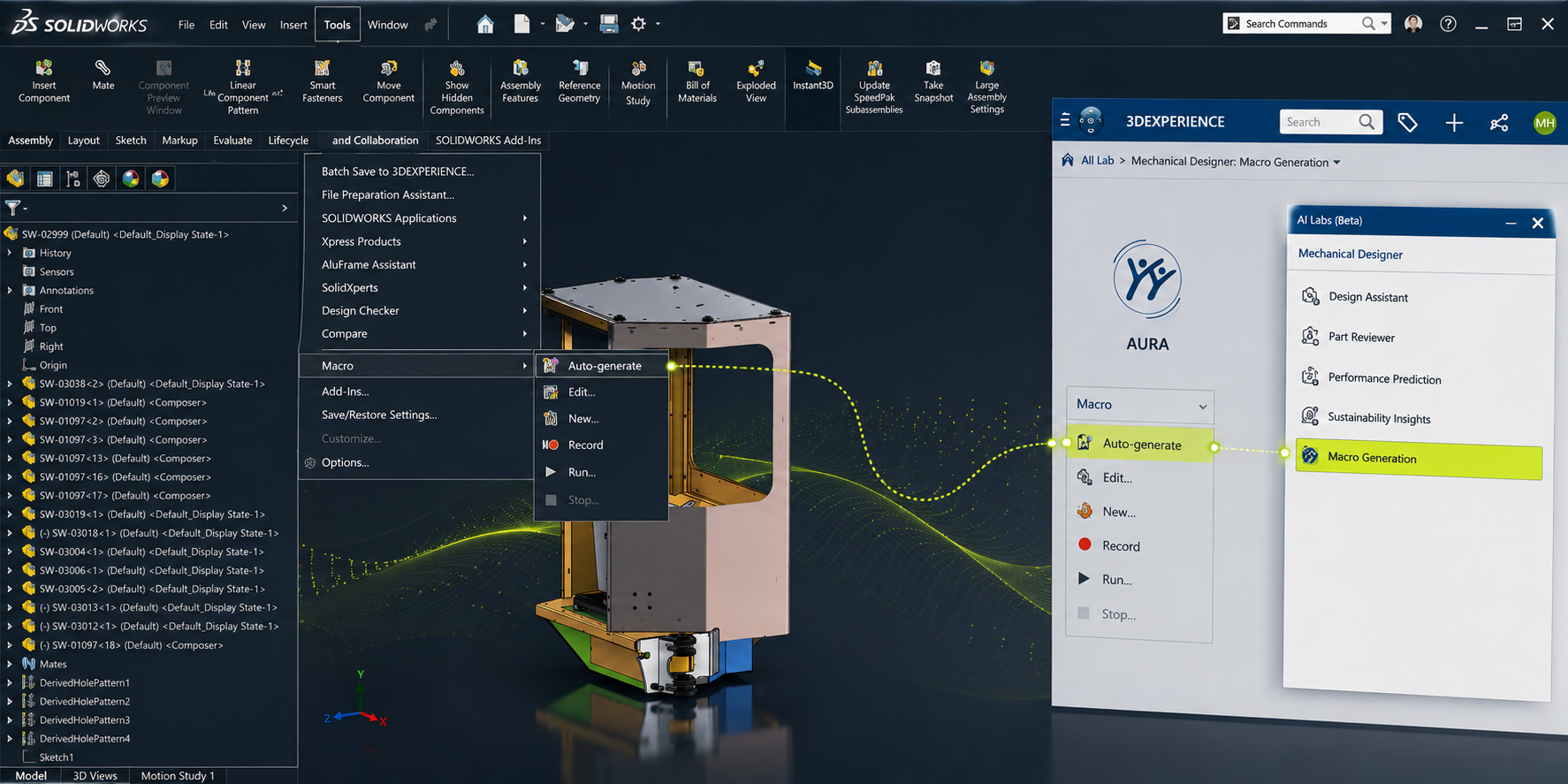
    Buried under Tools > Macro, there’s a new option:
    “Auto-generate”, complete with the AURA logo.

    At first glance, it doesn’t do much (yet). But it raises an interesting question:

    👉 Is SOLIDWORKS getting ready to generate macros for you using AI?

    Let’s take a closer look at what’s going on, and what it could mean for your day-to-day work.

    What We Found in the Interface

    Here’s where things get interesting.

    Inside the Macro menu, alongside familiar options like Record and Edit, there’s now:

    • Auto-generate

    • Marked with the AURA icon

    At the same time, digging into the AI Labs tab reveals something even more telling:

    Macro Generation listed as a competency

    That’s not placeholder language. That’s a capability label.

    So… What Is AURA, Exactly?

    If you’ve followed recent updates on the 3DEXPERIENCE platform, you’ve probably heard of AURA.

    AURA is Dassault Systèmes’ push into context-aware AI assistance, not just generating content, but actually:

    • Understanding what you’re doing

    • Anticipating next steps

    • Helping automate repetitive tasks

    In other words, it’s not just “AI for show.” It’s meant to sit inside your workflow.

    Macro generation fits that direction perfectly.

    Why This Matters (More Than It Looks)

    Let’s be honest, macros in SOLIDWORKS are powerful, but:

    • Most users don’t write them

    • Many rely on recorded macros (which are fragile)

    • Editing VBA code isn’t exactly user-friendly

    Now imagine this instead:

    👉 You describe what you want:

    “Rename all selected components using this convention”

    👉 And SOLIDWORKS builds the macro for you.

    That’s the gap this feature is aiming to close.

    What AI Macro Generation Could Look Like

    While the feature isn’t active yet, we can make some realistic assumptions based on current AI direction:

    1. Prompt-Based Automation

    You type a request, similar to how you interact with AI tools today.

    2. Context Awareness

    Instead of generic scripts, it understands:

    • Assembly structure

    • Selected components

    • Active document type

    3. Editable Output

    It likely generates:

    • VBA macros (initially)

    • Possibly with explanations or annotations

    4. Iterative Refinement

    Not quite right? Adjust the prompt instead of rewriting code.

    Is This Feature Live Yet?

    Short answer: No, not fully.

    Right now:

    • The Auto-generate option appears in the UI

    • But doesn’t execute (at least in SP2.1 environments we’ve tested)

    This strongly suggests:

    • It’s either feature-gated

    • Or not yet connected to backend AI services

    So no, you’re not missing a setting, it’s just not ready.

    Not an Easter Egg, A Direction

    It’s tempting to think this was accidentally left in the UI.

    But given:

    • The AURA branding

    • The AI Labs “Macro Generation” competency

    • The broader AI rollout in FD02

    This looks intentional.

    👉 More likely: a preview of what’s coming next

    What This Means for SOLIDWORKS Users

    If (or when) this becomes active, it could shift how teams approach automation:

    Less Dependency on API Expertise

    You won’t need to:

    • Learn VBA

    • Dig through API documentation

    Faster Process Standardization

    Teams could quickly:

    • Build repeatable workflows

    • Enforce naming conventions

    • Automate tedious cleanup tasks

    Lower Barrier to Entry

    More users can leverage automation, not just power-users.

    A Practical Example

    Let’s say your team regularly:

    • Imports vendor models

    • Needs to clean up feature trees

    • Apply materials

    • Rename files

    Today:

    • That’s either manual

    • Or handled by a fragile macro

    With AI macro generation:

    You could describe the workflow once, and reuse it reliably.

    Where This Fits in the Bigger Picture

    This isn’t happening in isolation.

    Dassault Systèmes is clearly moving toward:

    • AI-assisted modeling

    • Context-aware recommendations

    • Automation without coding

    Macro generation is just one piece of that puzzle.

    Should You Be Excited?

    Cautiously yes.

    But with realistic expectations:

    • First versions will likely be limited

    • Output may need validation

    • Complex workflows might still require manual refinement

    Still, even a 50% time savings on repetitive tasks is meaningful.

    Final Thoughts

    Right now, the Auto-generate macro button is more promise than product.

    But it tells us something important:

    👉 SOLIDWORKS isn’t just adding AI features, it’s rethinking how users interact with automation.

    And if this lands the way it’s intended, it could make one of the most underused features in SOLIDWORKS… actually usable.

    Want to Stay Ahead of What’s Coming?

    At Solidxperts, we keep a close eye on updates like this—not just what’s announced, but what’s emerging.

    If you want help:

    • Identifying automation opportunities

    • Preparing your team for AI-assisted workflows

    • Or getting more out of your SOLIDWORKS environment

    Reach out at info@solidxperience.com, we’re always happy to talk shop.


    Michael Habrich

    3DEXPERIENCE Specialist

    X_green_halo

    Any questions? Need help? Ask one of our experts.

    Whether you’re ready to get started or just have a few more questions, you can contact us toll-free:

      FAQ: AI at the Core of SOLIDWORKS and 3DEXPERIENCE

      BLOG

      FAQ: AI at the Core of SOLIDWORKS and 3DEXPERIENCE

      What is AI in SOLIDWORKS?

      At its core, SOLIDWORKS AI refers to a set of intelligent capabilities that assist engineers by automating repetitive tasks, providing design guidance, and enabling workflow orchestration through built-in features and Virtual Companions that can be interacted with using natural language.

      What AI features are currently available in SOLIDWORKS?

      Currently, available capabilities include automated drawing generation, general design assistance through an interactive chat interface, command prediction, sketch analysis and repair, fastener recognition, and many additional features that are being rapidly developed and expanded.

      Learn more about what’s available in SOLIDWORKS AI.

      Stay up to date with the latest SOLIDWORKS Design features.

      What is the difference between built-in AI features and Virtual Companions in SOLIDWORKS?

      On one hand, built-in AI refers to machine learning-based capabilities that enhance existing design workflows. On the other hand, Virtual Companions are AI assistants that can be engaged using natural language to access knowledge and perform specific tasks. Both built-in AI features and Virtual Companions are available directly within the SOLIDWORKS Design user interface.

      What are the roles of the new Virtual Companions?

      Unlike generic conversational agents, our companions embody AI at the heart of engineering, grounded in physics and causality.

      Name

      Specialty

      Example Application (E-Foil Wing)

      AURA

      Knowledge and Context

      Balances requirements for strength, lightweight construction, and water resistance (for example, choosing between carbon fiber and fiberglass).

      LEO

      Engineering Reasoning

      Optimizes the strength-to-weight ratio using carbon composites, specifically unidirectional carbon fiber with epoxy resin for stiffness and fatigue resistance.

      MARIE

      Materials Science

      Analyzes critical factors such as density (1.6 g/cm³), elastic modulus, and resistance to water-induced degradation.

      How do these entities collaborate to optimize a project?

      Innovation emerges from the combination of multiple perspectives. AURA explores the range of possibilities, MARIE grounds the project in rigorous materials science, and LEO ensures mechanical and manufacturing feasibility. Together, they help identify the optimal technical solution without compromising safety or manufacturability.

      Why is the move to the Cloud essential for these new AI capabilities?

      Knowledge extraction, deep data mining, and the execution of complex AI models require significant computing power. Cloud infrastructure is the only practical way to provide these resources flexibly and cost-effectively to organizations of all sizes.

      Does SOLIDWORKS AI use customer data for training?

      No. Customer data is not used to train AI models. Governance controls ensure the protection of intellectual property. You can learn more by visiting the 3DS Trust Center.

      Can AI automatically create drawings?

      Yes. SOLIDWORKS Design includes the ability to automatically generate 2D drawings by interacting with Virtual Companions using natural language. Drawings can be created according to specified standards, templates, and dimensioning schemes, helping accelerate the documentation process.

      Can AI automate repetitive CAD tasks?

      Yes. SOLIDWORKS AI automates repetitive engineering tasks such as drawing creation and assembly structure generation. Additional capabilities will continue to be introduced in future releases.

      How does SOLIDWORKS AI protect intellectual property?

      SOLIDWORKS AI ensures that customer intellectual property remains isolated and secure. Learn more about the specific security protocols by visiting the 3DS Trust Center.

      How do I get started with AI in SOLIDWORKS?

      Start by exploring the built-in AI capabilities and current Virtual Companion features available through the AI Lab task pane directly within SOLIDWORKS Design. Access to Virtual Companions requires Cloud Services to be enabled, which are included with every SOLIDWORKS Design license.

      Can AI automatically fix CAD models?

      AI can identify issues, explain errors, and suggest corrections. However, engineers remain responsible for reviewing and approving any modifications.

      Will AI replace CAD designers and engineers?

      No. AI helps automate repetitive tasks and uncover valuable insights, but engineers remain responsible for design intent, validation, and decision-making.

      Want to Learn More?

      Discover more tips and tutorials on our YouTube channel.

      Explore best practices with our experts.

      Or contact our team, we’re here to help you get the most out of your platform.


      Benoit Bilodeau

      Senior Solutions Architect

      X_green_halo

      Vous avez des questions ? Besoin d’aide ? Demandez à l’un de nos experts.

      Que vous soyez prêt à commencer ou que vous ayez quelques questions supplémentaires, vous pouvez nous contacter sans frais :

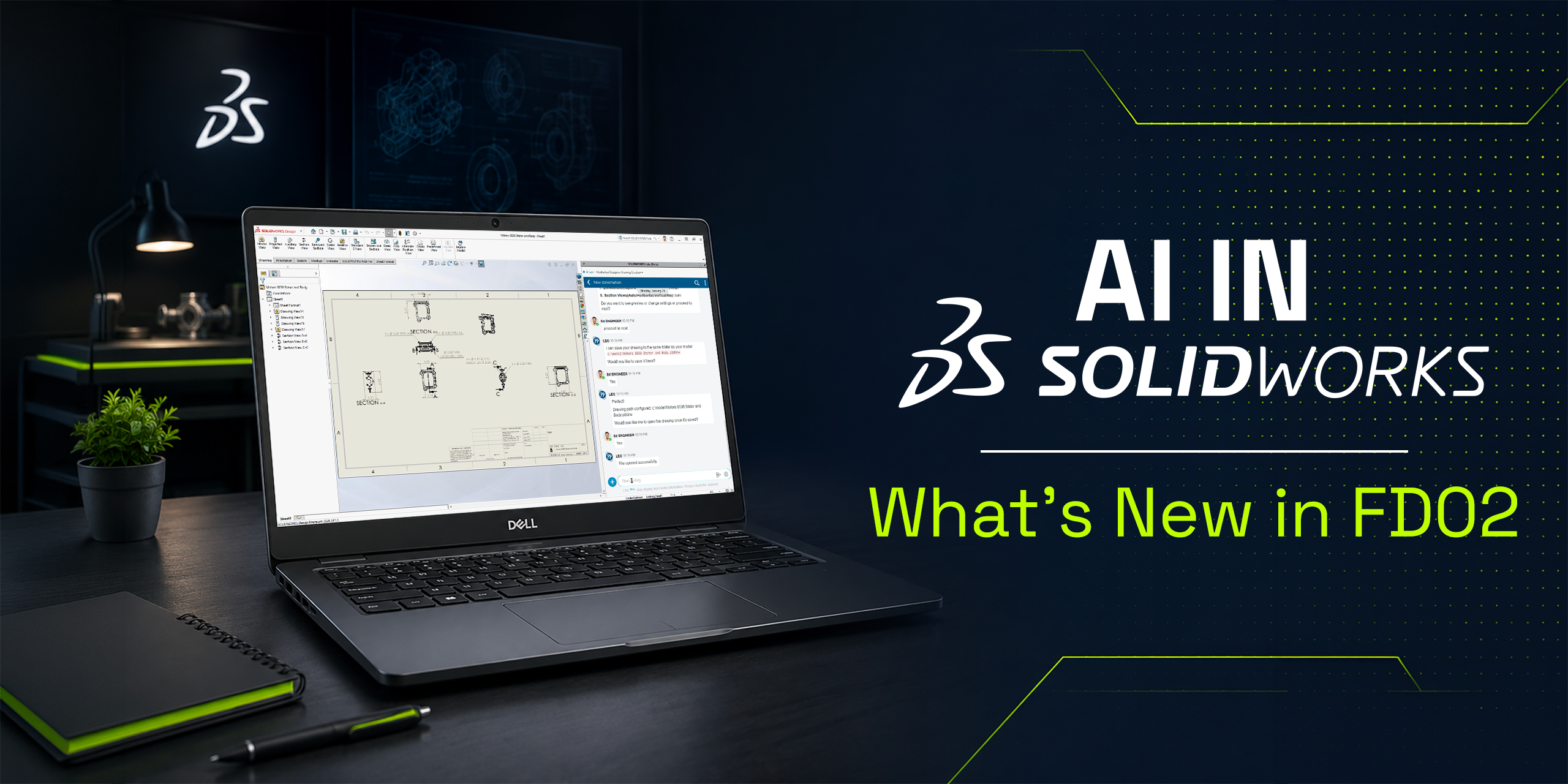
        AI in SOLIDWORKS: What’s New in FD02

        BLOG

        AI in SOLIDWORKS: What’s New in FD02

        [techtips_featured_image_shortcode]

        From Features to Assistants: A Shift in How You Work

        With the SOLIDWORKS 2026 FD02 update, AI is starting to feel less like a set of isolated tools, and more like an integrated part of your workflow.

        This release introduces two major concepts:

        • AI Virtual Companions (prompt-driven interaction)

        • Contextual Performance Assistants (proactive recommendations)

        Together, they represent a shift toward software that doesn’t just respond, but actively supports your decisions in real time.

        Let’s break down what’s new and what it actually means for your day-to-day work.

        A New Direction: AI That “Thinks Alongside You”

        Up until now, most AI features in CAD have been reactive:

        • You click a command

        • The software executes

        FD02 starts moving beyond that.

        Instead, SOLIDWORKS is introducing AI that:

        • Understands context

        • Responds to natural language

        • Flags issues before they become problems

        👉 The goal isn’t automation for its own sake
        👉 It’s reducing friction in engineering workflows

        AI Virtual Companion: Working with Prompts

        One of the biggest changes in FD02 is the expansion of the AI Virtual Companion.

        This is a text-based interface inside SOLIDWORKS where you can:

        • Ask questions

        • Request actions

        • Get insights about your model

        What’s New in FD02:

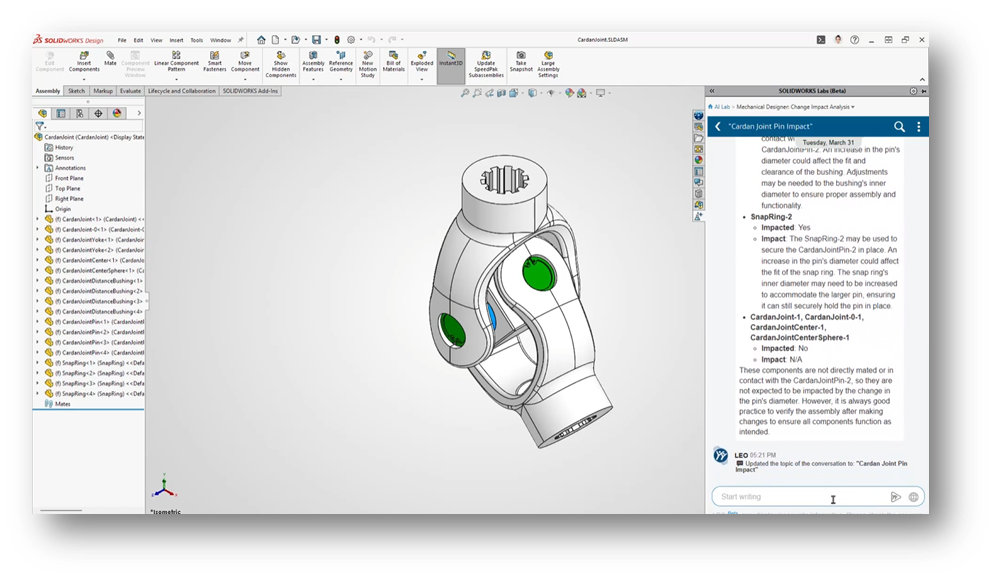
        Design Change Impact

        You can now ask:

        “What happens if I change this feature?”

        The AI will:

        • Scan the model

        • Identify affected parts and assemblies

        • Highlight downstream dependencies

        • Indicate who or what may be impacted

        Why It Matters:

        This allows you to evaluate risk before making changes, instead of reacting after something breaks.

        SOLIDWORKS 2026 FD02 interface showing AI-powered change impact analysis on a mechanical assembly model.

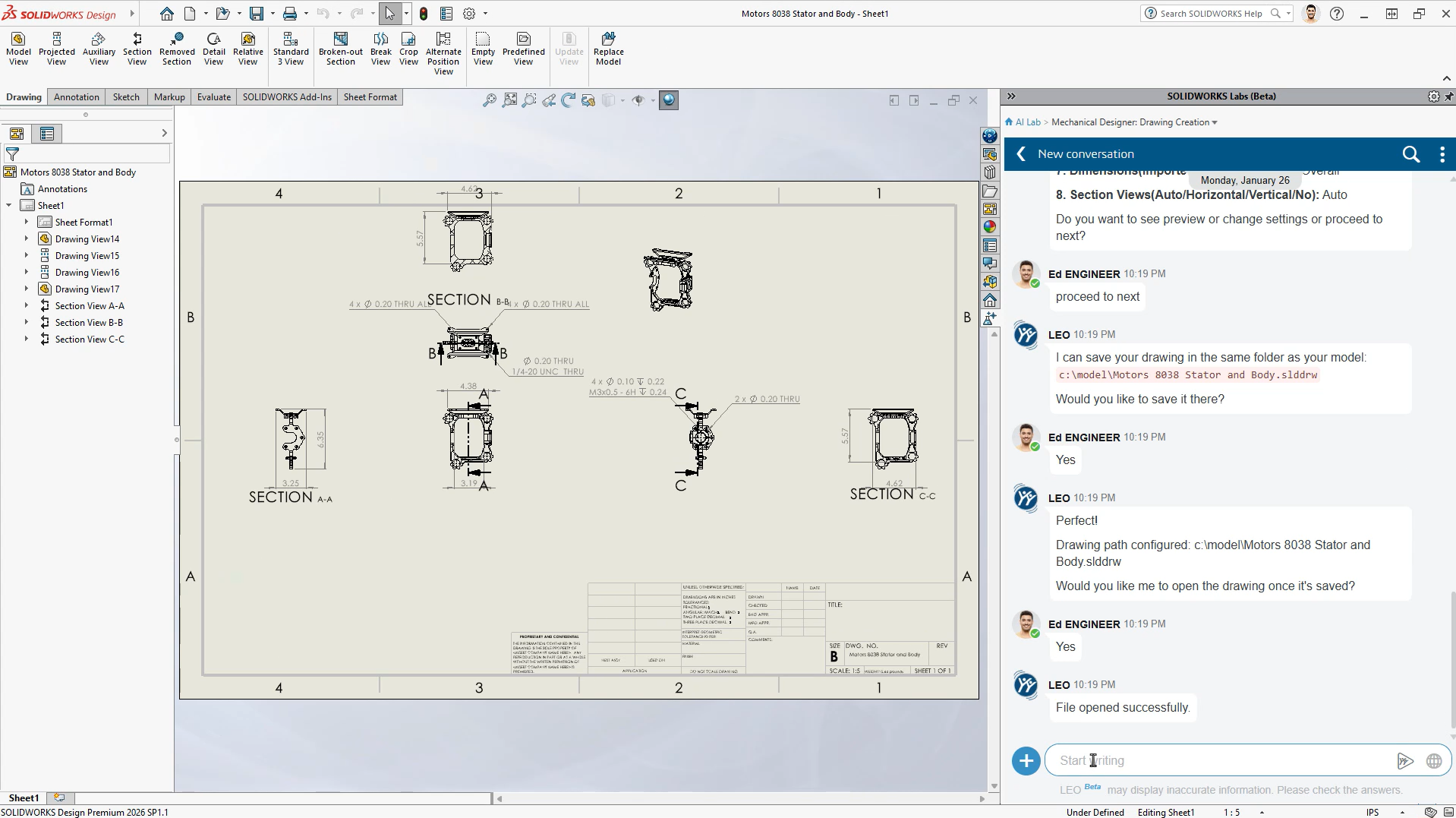
        Auto-Generate Drawings (Beta) – Now Prompt-Driven

        Auto-Generate Drawings gets a major upgrade.

        What’s New:

        • Direct access to the Drawing Creation AI skill

        • Ability to customize outputs using natural language prompts

        You can now:

        • Adjust drawing tables

        • Refine views

        • Modify layout behavior

        Why It Matters:

        You move from:

        “Generate → manually fix everything”

        to:

        “Generate → guide the result intelligently”

        SOLIDWORKS 2026 FD02 showing AI-assisted drawing creation with a conversational interface generating and saving technical drawings automatically.

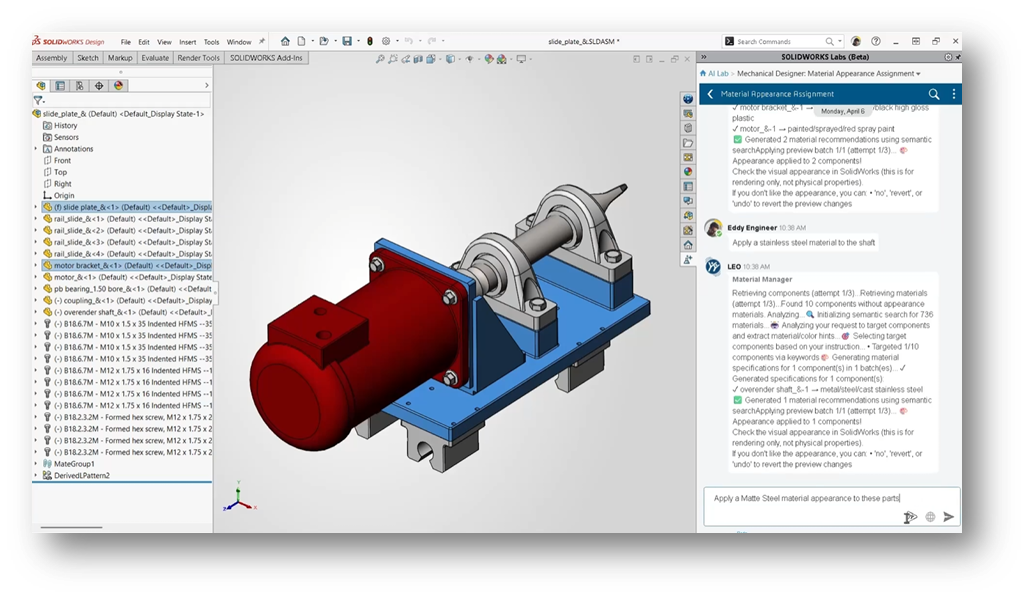
        Material Appearance Manager (Beta)

        What’s New:

        Using simple prompts, you can:

        • Apply material appearances

        • Update visuals across assemblies

        • Maintain consistency automatically

        Why It Matters:

        It removes repetitive cleanup work and improves visual standardization, especially in larger assemblies.

        SOLIDWORKS 2026 FD02 interface showing AI-assisted material appearance assignment on a mechanical assembly using natural language prompts.

        Contextual Performance Assistants: Proactive Help

        The second major innovation in FD02 is the introduction of always-on performance assistants.

        Instead of waiting for you to troubleshoot, these tools:
        👉 Monitor your work in real time
        👉 Flag issues as they appear
        👉 Recommend fixes immediately

        You’ll typically see these as contextual prompts or purple notifications in the interface.

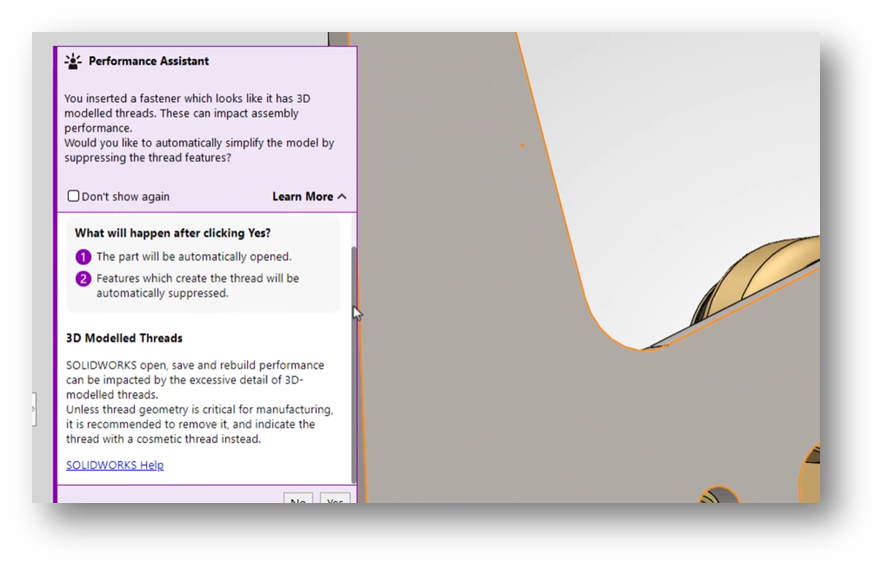
        Fastener Simplification

        When inserting detailed fasteners (like threaded hardware):

        The assistant will:

        • Detect performance-heavy geometry

        • Explain the impact

        • Offer to suppress threads automatically

        Why It Matters:

        This is a perfect example of AI preventing problems before they slow you down.

        SOLIDWORKS 2026 FD02 Performance Assistant warning users about detailed threaded fasteners and recommending automatic geometry simplification to improve assembly performance.

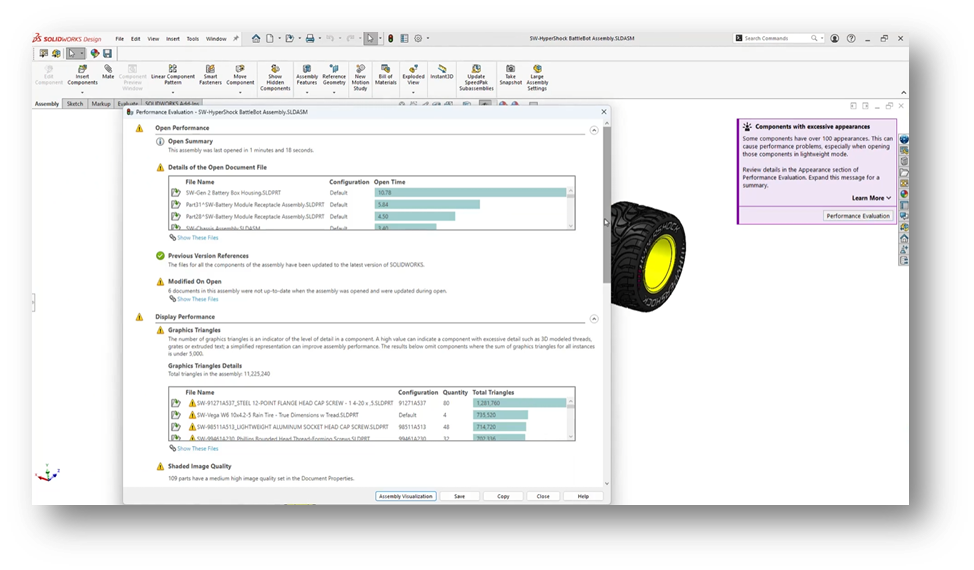
        Assembly Performance Evaluator (Beta)

        What’s New:

        You can now:

        • Ask questions about assembly performance

        • Receive AI-generated diagnostics

        • Get targeted recommendations

        Why It Matters:

        Large assemblies are complex to troubleshoot manually.

        This tool turns:

        Trial-and-error debugging

        into:

        Guided, data-driven optimization

        SOLIDWORKS 2026 FD02 showing AI-driven assembly performance evaluation with diagnostics and recommendations for optimizing large assemblies.

        AI-Driven Modeling: Fixing a Longstanding Problem

        BREP to Parametric CAD (Beta)

        This is one of the most impactful additions in FD02.

        What’s New:

        AI converts:

        • STEP

        • IGES

        into:

        • Fully editable, feature-based SOLIDWORKS models

        Why It Matters:

        You can:

        • Modify imported geometry

        • Avoid rebuilding parts from scratch

        • Work faster with supplier or legacy data

        This directly addresses one of the biggest inefficiencies in CAD workflows.

        SOLIDWORKS 2026 FD02 converting imported geometry into a fully editable parametric CAD model using AI-driven feature recognition.

        AI Beyond CAD: Data and Governance:

        FD02 also expands AI into data management and PLM workflows.

        PLM Model Insights

        You can query:

        • Revision history

        • Ownership

        • Maturity state

        • Related files

        Using natural language.

        SOLIDWORKS 2026 FD02 showing AI-powered PLM model insights with revision history and lifecycle data accessed through natural language queries.

        Governance Automation (Beta):

        Includes:

        • Auto Task Creation

        • Create PLM Change Action

        Why It Matters:

        AI is now helping manage:

        • Workflows

        • Approvals

        • Change processes

        Not just geometry.

        SOLIDWORKS 2026 FD02 showing AI-assisted project planning and automatic task creation within a PLM workflow interface.

        A Clear Trend: From Tools to Teammates:

        Looking at FD02 as a whole, the direction is clear.

        AI in SOLIDWORKS is evolving toward:

        • Conversational interaction (ask instead of search)

        • Proactive assistance (alerts instead of errors)

        • Automation of repetitive tasks

        • Better visibility into design and data

        This isn’t about replacing engineers.

        It’s about:
        👉 Reducing manual overhead
        👉 Improving decision-making
        👉 Keeping workflows moving

        What You Need to Access These Features:

        To use most AI functionality in FD02, you’ll need:

        • SOLIDWORKS 2026 (FD02 or newer)

        • Access to the 3DEXPERIENCE platform

        • Proper roles (e.g., Collaborative Designer for SOLIDWORKS)

        • Active cloud connectivity

        Need help? Follow our guide on how to get started with AI in SOLIDWORKS:
        Guide: Getting Started with AI in SOLIDWORKS

        Should You Start Using AI in FD02?

        Yes, but with a clear strategy.

        Start with:

        • Assembly Performance Evaluator

        • Auto-Generate Drawings

        Then explore:

        • BREP to Parametric CAD

        • Design Change Impact

        Keep in mind:

        • Many features are Beta

        • Outputs should always be validated

        • AI is an assistant, not a decision-maker

        AI Is Becoming Embedded

        FD02 marks an important shift as we move from standalone AI features to integrated, workflow-aware intelligence. But the biggest change is not necessarily what AI can do. It’s how naturally it fits into the way engineers already work every day.


        Michael Habrich

        3DEXPERIENCE Specialist

        X_green_halo

        Any questions? Need help? Ask one of our experts.

        Whether you’re ready to get started or just have a few more questions, you can contact us toll-free:
          Why SOLIDWORKS Is Leading the AI Revolution in CAD

          BLOG

          Why SOLIDWORKS Is Leading the AI Revolution in CAD

          [techtips_featured_image_shortcode]

           SOLIDWORKS and its parent company, Dassault Systems, have been ahead of the competition when it comes to all things AI. SOLIDWORKS started developing AI features, also known as Smart Features, decades ago, giving their software a lead above the competition. While continuing to invest and stay ahead of the pack, all new AI assistants are now directly available within the application, ensuring that integration is seamless.

          Follow along in this blog, because I want to show you all the amazing features SOLIDWORKS has already implemented over the year, along with what is in store for the future. By the end, I will have shown how the recent attempts of our competition’s software do not hold a candle to the advances SOLIDWORKS has already made, let alone what is in store for the future.

          Past Additions of Machine Learning and Artificial Intelligence

          For over a decade, SOLIDWORKS has been continuously adding features that make use of machine learning and artificial intelligence. From features such as Smart Mates or Smart Fasteners to new AI Drawing Creation, SOLIDWORKS has been working to optimize engineer time, and reduce the number of tedious repetitive tasks.

          Excelling in time optimization for years, SOLIDWORKS has continued making tools designed with engineering resources in mind. Tools like Fully Defined Sketch and Selection Accelerators have been available for years, helping make the sketching and selection processes faster. Always improving, SOLIDWORKS took the predictive selection accelerator from the Fillet command, and added it into Chamfers in recent years, making seamless group selection even easier than before in both features.

          Machine Learning and Artificial Intelligence

          Users can go from this underdefined sketch to this fully defined sketch in 3 quick clicks!

          Machine Learning and Artificial Intelligence 2

          There have even been productivity increasing tools in the assembly environment for just as long! Smart Fasteners and Smart Mates have allowed engineers to snap together parts and fill their holes with fasteners for over a decade. Even before the general public heard about AI and chatbots, SOLIDWORKS has been working to implement AI based features to improve the engineering experience.

          Current SOLIDWORKS AI Tool Additions

          In 2026, SOLIDWORKS continues this trend of improving the engineering experience through implementing countless new features in the most recent as well as future updates. Some such features include AI Drawing Creation, AI Assembly Creation, Automatic Fastener Recognition, Command Predictor, and Pattern Assistant, to name a few. With these tools, SOLIDWORKS will become even smarter, and can predict an engineer’s next move; whether that move is dropping a nut into place, or needing to add a pattern of bolts in one swift movement. SOLIDWORKS can now even assist engineers in making sure the most efficient patterning methods are being used, as an efficiency check to young engineers.

          SOLIDWORKS AI Tool Additions

          Tools, like Automatic Fastener Recognition, make use of a database of thousands of fastener files, allowing the SOLIDWORKS AI to determine if a part is a fastener as soon as it is dragged in to your current project. This recognition will allow the system to offer better mate conditions and groupings, for instance pairing a new nut to your existing bolt.

          Additionally, features like AI Drawing Creation and AI Assembly Creation take processes out of the engineers hands and begin these processes in the system background before bringing the engineer in for confirmation. From laying out standard views and annotations, to organizing folder structures in assemblies, SOLIDWORKS continues to assist in simplifying and standardizing these initial steps in creation and documentation.

          SOLIDWORKS AI Tool Additions

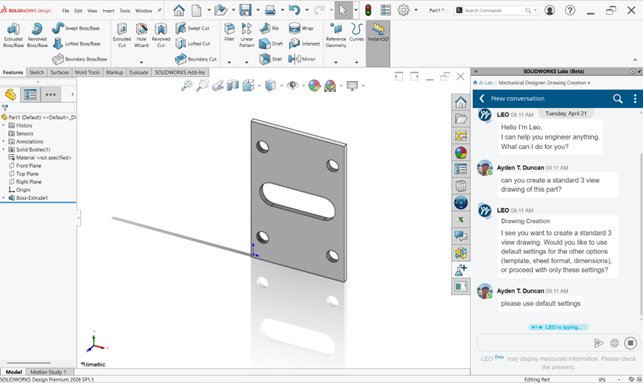
          With the use of SOLIDWORKS AI Drawing Creation, a simple conversation with LEO about the desired settings and defaults leads to a drawing created faster than ever before!

          SOLIDWORKS AI Tool Additions

          Addition of AI assistants in SOLIDWORKS

          SOLIDWORKS AI Assistants

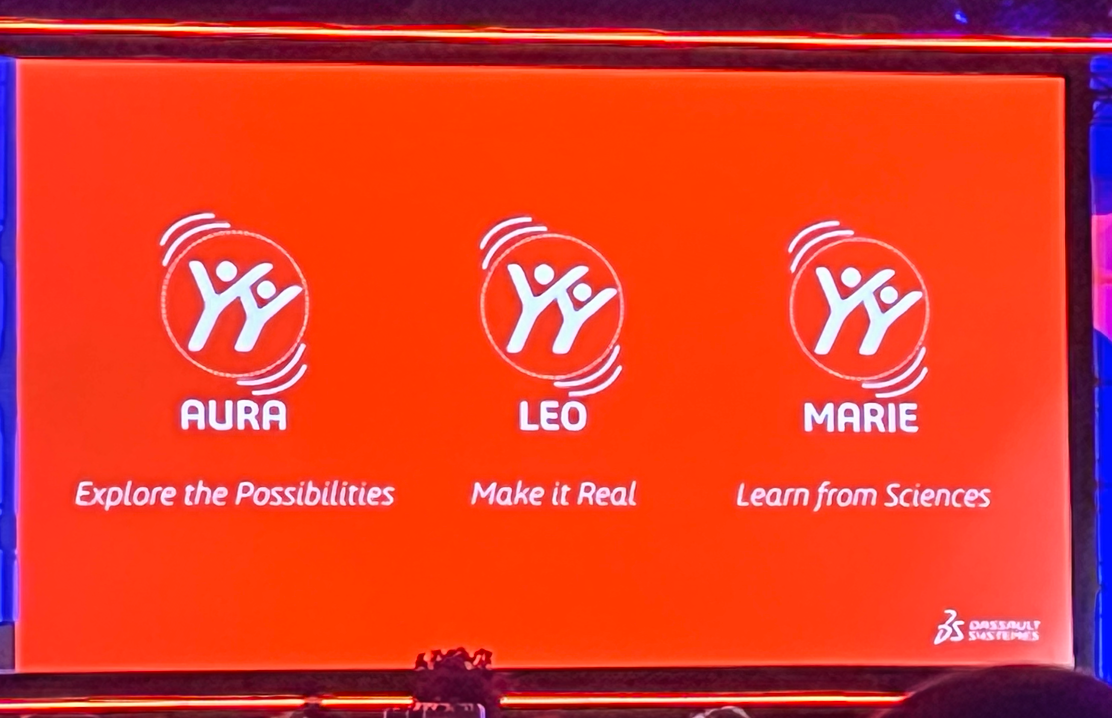
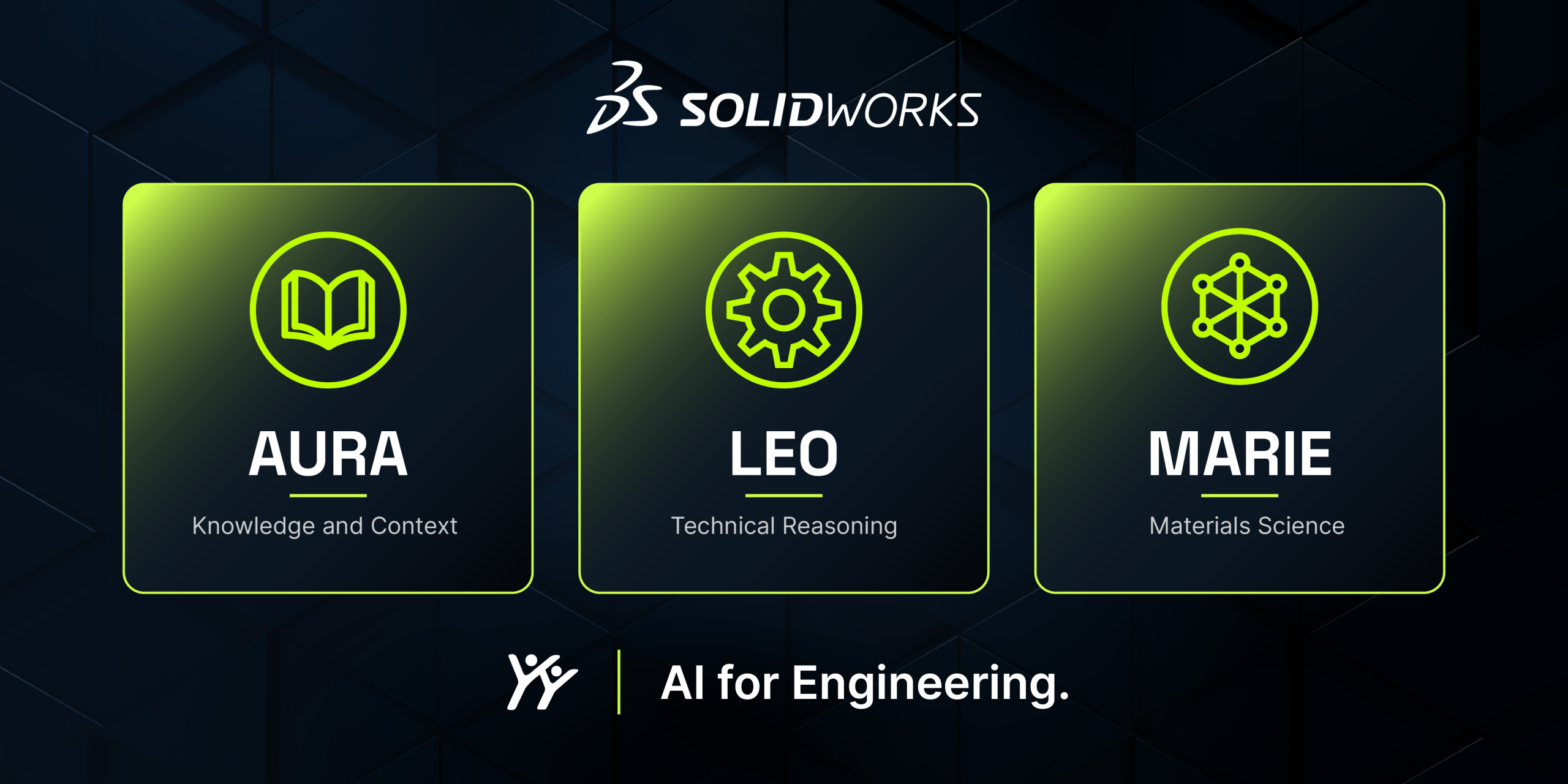
          The most recent additions of artificial intelligence to SOLIDWORKS include the three all new AI assistants; AURA, LEO, and MARIE. Each serves a unique role throughout the CAD Design process, as described below.

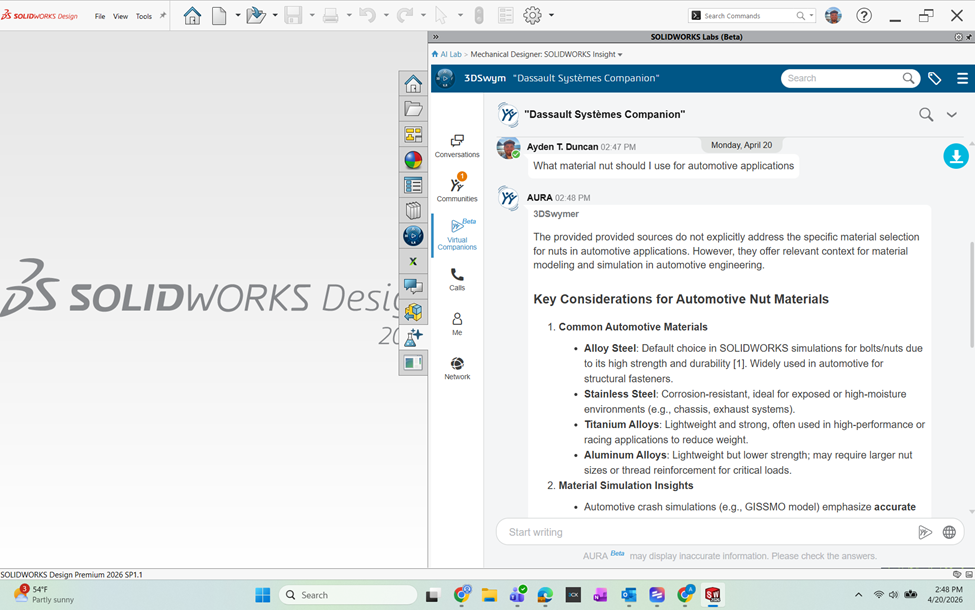
          AURA is the starting point of any great project, even before you draw your first sketch. AURA holds the ability to leverage knowledge from both web and enterprise sources, making it your one stop shop for rapid confirmation. For questions regarding basic design rules and suggestions, or even searching your company’s knowledge base, AURA can answer it all.

          After the first steps with AURA are completed, LEO takes the reins. LEO can help users effectively solve many complications through the design process, helping validate your design and optimize your processes. Throughout both mechanical design, as well as simulation, LEO can take your prompts to generate assembly structures, as parametric features, run studies, and even help resolve design errors. For both answering questions, and offering solutions, LEO can solve many engineering headaches.

          The last assistant in the lineup is MARIE, your scientific research specialist. With expertise in materials science, chemistry and more, your thorough scientific research can be simplified. With this third member of the SOLIDWORKS AI trifecta, you have an assistant in your corner for every part of the engineering design process.

          Competitors attempts at replication

          Outside of SOLIDWORKS, many competitors have tried their hand in implementing AI for the benefit of users. While many companies have had good feature additions in recent years, it is hard to compare them to the decades of experience and additions seen in SOLIDWORKS. The following sections detail some of these features within the competing software, and shows how SOLIDWORKS has taken the lead in all things AI.

          For starters, Autodesk has invested in AI in Fusion 360. However, you will find no such features in Inventor. Looking into these, features like CAM hole recognition have existed in SOLIDWORKS for some time. The drawing AI tool seems to be in the early stages, having very little interaction or flexibility. Fusion can add relationships and dimensions automatically, much like Fully Define Sketch (something that has existed in SOLIDWORKS for nearly 20 years). The main hurdle that Autodesk will have to overcome is that their files don’t talk to each other, unlike the fully associative files found in SOLIDWORKS, making their AI feature development harder.

          Other competitors like Siemens have three main enhancements, Magnetic Snap, Automated Drawings, and a design copilot, all things that have existed or do now exist in SOLIDWORKS. Lastly, Onshape has a lot of potential due to their cloud-based nature, however the content released as of now is just in the infancy stage.

          The Bottom Line: SOLIDWORKS AI is Changing the Game

          After looking at the history of feature development, as well as a brief look at the competition, you can see that SOLIDWORKS continues to be designed with the engineer in mind. From features that increase productivity by decreasing repetition, to tools that give you a head start in the design process, SOLIDWORKS is a lifesaver. Many competitors’ Artificial Intelligence ambitions are just beginning, so SOLIDWORKS is working hard to maintain the lead they already have, while pushing engineering design technology to the next level. Our SOLIDWORKS Technical Team has been ahead of the pack when it comes to learning and using AI, so please contact us with any questions, and find out what makes us the Solidxperts.


          Alain

          Alain Provost

          Senior Technical Sales Executive

          X_green_halo

          Any questions? Need help? Ask one of our experts.

          Whether you’re ready to get started or just have a few more questions, you can contact us toll-free:
            AI won’t replace you. Someone using AI will.

            BLOG

            AI won’t replace you. Someone using AI will.

            [techtips_featured_image_shortcode]

            AI may not be perfect yet, but it’s precisely why you should start using it today.

            We’ve grown used to talking about artificial intelligence as if the story began in 2022. ChatGPT arrives, the public adopts it, and suddenly AI becomes a topic of casual conversation. But if we want to properly understand what’s happening, we must not confuse media frenzy with historical reality. OpenAI did release ChatGPT publicly (“research preview”) on November 30, 2022, and yes, it was a real social inflection point.

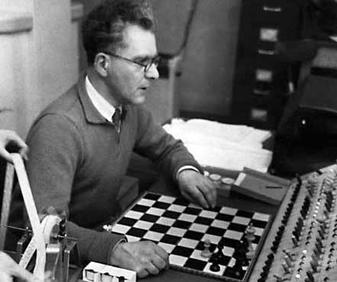
            But AI as a field is much older. Turing formalized the intellectual framework of the “imitation game” as early as 1950, and the Dartmouth Proposal (1955) explicitly announced a summer 1956 project dedicated to “artificial intelligence.” Some early demonstrations also appeared quickly: the Ferranti Mark I ran a limited chess program in 1951 (mate-in-two).

            This reminder is not meant to give you a history lesson. It serves one purpose: AI is not a feature. It is a trajectory.

            And it resembles another well-known human trajectory: that of fire.

            The Fire Analogy: Understanding a Technology We Don’t Yet Understand

            At this point, you’re probably thinking: “What is he talking about?” Stay with me.

            One day, in a cave, one of our ancestors discovered fire. At first, this discovery served very specific purposes: heating, lighting, protection. These were not “industrial innovations”; they were immediate uses. And yet, the full chain – metallurgy, machines, steel industries – that followed from this same discovery reshaped modern history. The human on day one could not imagine the human of today. Not because they were less intelligent, but because they lacked perspective.

            We are at the same stage. Except instead of holding a torch, we are writing prompts. And the typical mistake in 2026 is judging AI based on what it is today, as if it were representative of tomorrow’s trajectory.

            The Real Signal: Speed of Evolution

            What matters is not only what AI does today. What matters is how fast it improves. To make that speed tangible, a cultural artifact has emerged: the “Will Smith Eating Spaghetti test,” now documented as an informal benchmark.

            Case Study: The “Spaghetti Test”

            In its 2023 version, human motion is unstable: faces and hands deform, physics is not believable. In the 2026 version, the result becomes coherent enough that the difference is obvious: we are no longer looking at a “grotesque meme,” but at a rendering that requires a critical eye to detect AI involvement.

            What matters here is the underlying learning dynamic. The progression observed between 2023 and 2026 cannot be attributed solely to model improvements. It is also the result of user adoption.

            Early uses produced low-quality, unstable, and difficult-to-use outputs. However, these experiments helped gradually identify model limitations, refine interaction methods (prompts, iterations, post-processing), and structure more robust practices.

            In other words, the improvement in outputs in 2026 is inseparable from the learning accumulated by users over time. Current performance is not only technological; it is also cognitive and methodological.

            This is how the concept of cumulative advantage should be understood: it does not rely solely on access to technology, but on the experience gained by using it under imperfect conditions.

            From Internet Culture to the Engineering Office: Why SOLIDWORKS Is Concerned

            The transition from “spaghetti → SOLIDWORKS” is not arbitrary. It is the same mechanism applied in a different context. A general-purpose technology crosses a threshold, then infiltrates products, becomes invisible, and ultimately reshapes practices.

            We’ve already seen this in the 2010s: AI did not “look like ChatGPT,” but it was already embedded in everyday life. Google Maps, for example, deployed models (including graph neural networks) at scale for ETA (Estimate Time of Arrival) and traffic prediction. The result: you use AI without thinking about it. The advantage rarely comes from an “AI button,” but from the routines that evolve around your activity.

            SOLIDWORKS 2026: The AI Shift Is Underway

            This is exactly the same dynamic in SOLIDWORKS.

            SOLIDWORKS 2026 already integrates AI into areas where real time is lost: drawings, assemblies, and access to knowledge. Dassault Systèmes presents SOLIDWORKS 2026 as an “AI-powered” portfolio (design, collaboration, data management).

            A clear example: Auto-Generate Drawings (BETA). The “What’s New in SOLIDWORKS 2026” documentation explicitly describes automatic drawing generation, including section views and hole callouts.

            The same logic applies to assemblies: SOLIDWORKS documents AI-based fastener recognition to automatically create SmartMates, with explicitly listed limitations. This level of detail is precisely what makes the promise credible (and reminds us that this is not “magic,” but engineering with constraints).

            Rather than listing every available feature, it is more relevant to focus on the direction: Dassault introduces “Virtual Companions” (AURA, LEO, MARIE), with AURA and LEO already available and MARIE announced soon. SOLIDWORKS also highlights “AI-guided” features in FD01 (guided analysis, guided creation).

            What matters here is not proving that everything is ready. It is recognizing that AI has entered the tool, meaning the learning process has begun, whether you like it or not. And it is moving fast.

            Waiting for Maturity: A Strategic Mistake

            Let’s be clear: in 2026, all of this is still imperfect. And that is normal. We are at the “spaghetti 2023” stage of AI-assisted CAD: promising, functional in certain areas, but not yet obvious everywhere.

            The instinctive reaction for many teams is: “we’ll wait until it’s mature.”

            This reaction is human. But strategically, it is a serious mistake.

            In 2025, we clearly entered a phase of mass adoption. Nearly 88% of organizations report using AI in at least one function, compared to 78% the previous year. This adoption is accelerating and follows an exponential curve.

            From an economic perspective, the signals are just as clear. The generative AI market reached nearly $60 billion in 2025 and could exceed $400 billion by 2031.

            In industry, the shift is already visible: nearly 76% of manufacturing companies are using AI in 2026.

            But the most interesting point is not adoption. It is the gap between adoption and impact. Despite massive investments, only about 5% of companies currently manage to generate significant value from AI. In most cases, projects remain stuck at the experimental stage, and the majority of initiatives never reach production.

            In other words: everyone has access to AI, but very few truly know how to use it. So “waiting” does not mean being cautious. It means allowing a capability gap to form. Because knowing how to use AI is a skill. And it must be learned.

            What Research Says About Gains (and Their Limits)

            To address the assumption “we’ll wait until AI is ready,” it is important to understand a key nuance: AI does not deliver uniform gains, and that is precisely why early learning matters.

            The operational conclusion is simple: early adoption is not a blind bet; it is a mapping phase. It helps you understand when AI works, when it fails, and most importantly how to control it.

            What It Really Changes: Redefining Engineering Performance

            This is where the thesis becomes concrete: AI will not replace you. A competitor who masters it will.

            And I mean mastery in the strict sense. Asking ChatGPT for a carbonara recipe does not count. We are talking about work practices, standards, quality control, understanding when AI accelerates a task and when it introduces risk, knowing where to integrate AI in a project without breaking traceability, and knowing how to train teams without creating blind dependency.

            In other words, mastery is not built when the tool becomes “perfect.” It is built while it is imperfect, because that is when you establish your standards, your checklists, your controls, and your best practices.

            Ultimately, the value of an engineer will not only be their technical skill. It will be their ability to amplify that skill with properly framed AI.

            Conclusion: From Intention to Action

            The question is no longer whether you are using AI. It is already present in your tools, your processes, and your competitive environment.

            The real question is whether you are learning to use it properly.

            Like all major technological transformations, the advantage does not go to those who wait for everything to stabilize. It goes to those who start while it is still imperfect, who experiment, who structure, and who gradually build solid methods.

            AI does not replace engineering. It redefines its standards.

            And this transition does not happen alone.

            At solidxperts, our teams are already working with these tools on a daily basis. We support companies in implementing practical AI use cases in SOLIDWORKS: identifying relevant use cases, integrating them into existing processes, training teams, and establishing reliable standards.

            If you want to understand concretely what AI can bring to your environment, we offer demos and working sessions tailored to your reality.

            The simplest next step is to start the conversation.


            Max Laramée

            Max Laramée

            Marketing Director

            X_green_halo

            Any questions? Need help? Ask one of our experts.

            Whether you’re ready to get started or just have a few more questions, you can contact us toll-free:
              7 Myths About AI: Demystifying Bias and Technological Limits

              BLOG

              7 Myths About AI: Demystifying Bias and Technological Limits

              [techtips_featured_image_shortcode]

              Every wave of innovation in artificial intelligence (AI) brings real technological progress, along with a dramatic rise in hype. With every breakthrough, new narratives emerge: AI is portrayed as “magical,” endowed with its own will, on the verge of becoming superhuman, or conversely as something completely uncontrollable by law.

              As a result, this fog of myths makes AI opaque to the public, complicates decision-making for organizations, and distracts attention from the real technical and societal challenges.

              In this article, we aim to clarify two key questions:

              • What are the main myths currently surrounding AI?

              • And what technical, physical, and social realities help dismantle them?

              The Major Myths Shaping Our View of AI

              Several myths structure today’s collective imagination about artificial intelligence.

              “AI has agency.”
              The idea that AI systems act on their own initiative, with intentions, goals, or desires.

              “Superintelligence is imminent.”
              The belief that we are only a few years, or even months, away from a general intelligence far surpassing human capabilities.

              “AI can be objective or impartial.”
              The assumption that algorithms are inherently neutral because they rely on computation.

              “AI has a clear definition.”
              As if AI referred to a single, clearly defined technology, when in reality no universal definition exists.

              “Ethical guidelines are enough to protect us.”
              The perception that voluntary ethical charters are sufficient safeguards against harmful AI uses.

              “AI cannot be regulated.”
              The claim that technological innovation moves too fast for legal systems to keep up.

              “AI can solve any problem.”
              The idea that AI is a universal solution applicable to any technical, economic, or social challenge.

              In reality, these myths stem from a mixture of marketing, science fiction, and technical misunderstanding. To move beyond them, we need to return to what AI actually is today.

              1. Agency and Consciousness: AI as a “Stochastic Parrot”

              One of the most common misconceptions is attributing intention to AI. We often talk about what AI “wants,” “decides,” or “thinks.” Yet modern systems, especially large language models (LLMs), function much more simply.

              Models That Predict, Not Understand

              An LLM does not interpret your sentences in the human sense. Technically, it:

              • receives a sequence of tokens (pieces of words) as input

              • computes a probability distribution over the next token using a trained neural network

              • selects or samples the next token according to this distribution

              • repeats the process until a complete response is produced

              This mechanism relies on massive statistical correlations learned during training. At no point does the system possess:

              • semantic understanding of concepts

              • an internal model of the world comparable to a human’s

              • independent intentions or goals

              In other words, what researchers sometimes call a “stochastic parrot”: a machine that reproduces learned language structures in sophisticated probabilistic combinations.

              Anthropomorphism as a Persistent Bias

              If these systems appear to “think,” it is largely because humans naturally anthropomorphize systems that display seemingly intelligent behavior. This cognitive bias is central to many misunderstandings about AI today.

              2. Superintelligence and the Resource Wall

              Another dominant narrative suggests that we are on the verge of general superintelligence, held back only by corporate caution. However, the actual infrastructure behind AI tells a different story.

              The Data Wall: A Finite Resource

              Today’s large models rely on enormous volumes of high-quality human-generated data: text, conversations, code, and multimedia content. But this resource is not infinite.

              Estimates suggest that high-quality training data suitable for ever-larger models could be largely exhausted between 2026 and 2032. Beyond that point:

              • existing datasets would be reused repeatedly, yielding limited improvements

              • or synthetic data would be used, introducing new risks and feedback loops

              Physical Constraints and Diminishing Returns

              The idea of unlimited growth in model power faces several practical limits.

              Energy and cooling constraints
              The computing density required for training and deploying the largest models pushes data centers toward limits in:

              • electrical grid capacity

              • cooling infrastructure needed to dissipate heat

              Hardware limits
              GPUs and other accelerators are approaching physical limits in terms of performance per watt and cost efficiency.

              Diminishing returns
              Scaling models by increasing parameters, data, or compute still improves performance, but each additional gain becomes smaller relative to the resources invested.

              These “resource walls” do not prevent progress, but they challenge the idea of a straightforward path toward limitless superintelligence.

              3. Objectivity and Impartiality: AI as a Mirror of Human Bias

              AI is often presented as a way to eliminate human bias. In reality, AI systems frequently inherit and sometimes amplify existing inequalities.

              Data Bias: Who Is Represented?

              Models can only generalize effectively if training data represent a sufficiently diverse set of situations and populations.

              When datasets are imbalanced, performance degrades unevenly. Studies have shown, for instance, that some facial recognition systems exhibit error rates up to 35% higher for darker-skinned women than for white men.

              This is not an isolated bug. It reflects underlying representation biases in the data.

              Design Bias: Optimization Choices Matter

              Even with balanced datasets, models reflect the priorities of their designers:

              • How is overall accuracy balanced against fairness between groups?

              • Which metrics are optimized during training and deployment?

              • What trade-offs are accepted between false positives and false negatives?

              These decisions directly shape who benefits from an AI system and who may be harmed. Claims of algorithmic objectivity often overlook these design choices.

              4. The Plural Architecture of AI

              Contrary to popular belief, “artificial intelligence” does not describe a single unified technology. Instead, it is an umbrella term covering a broad and heterogeneous set of methods, theories, and applications.

              A Hierarchy of Often-Confused Concepts

              Many people use AI, Machine Learning, and Deep Learning interchangeably, although they represent different levels of abstraction.

              Artificial Intelligence (AI)
              The broader field of computer science focused on creating systems capable of performing tasks that require human-like cognitive abilities.

              Machine Learning (ML)
              A subset of AI in which systems learn patterns from data rather than relying solely on explicit programming.

              Deep Learning (DL)
              A specialized ML approach using multi-layer neural networks to process complex data such as images, speech, or language.

              Divergent Definitions

              The meaning of AI changes depending on perspective.

              • Scientific definition: a research discipline exploring computational models of cognition.

              • Technological definition: systems capable of perceiving their environment and taking actions accordingly.

              • Popular definition: a largely anthropomorphic vision attributing awareness or autonomy to machines.

              A Fragmented Ecosystem

              AI is not monolithic. It includes multiple research traditions and technical approaches.

              Two historical families illustrate this diversity:

              Symbolic AI
              Systems based on logical rules and expert knowledge.

              Connectionist AI
              Statistical approaches based on large datasets and neural networks, including modern language models.

              Narrow AI vs General AI

              Today’s systems belong entirely to narrow AI, designed to perform specific tasks such as:

              • playing chess

              • recognizing objects in images

              • detecting fraud

              • generating text

              Artificial General Intelligence (AGI), capable of learning any intellectual task a human can perform, remains a speculative concept.

              5. Ethics, Marketing, and the Need for Regulation

              In response to AI risks, many organizations have adopted ethical charters and voluntary guidelines. While useful, these tools have clear limitations.

              Ethical Marketing

              Without enforcement mechanisms, many ethical charters function more as reputation tools:

              • they reassure stakeholders

              • they improve brand image

              • but they rarely prevent high-risk systems from being deployed

              Toward Enforceable Regulation: The EU AI Act

              Contrary to the myth that AI cannot be governed, regulatory frameworks are emerging.

              The European Union’s AI Act proposes a risk-based approach:

              • Unacceptable risk systems are banned

              • High-risk systems must comply with strict requirements including transparency, traceability, documentation, conformity assessments, and human oversight

              • Minimal risk systems face limited regulation

              The goal is not to slow innovation, but to ensure that AI systems remain accountable within existing legal frameworks.

              6. AI Is Not a Magic Wand

              Perhaps the most persistent myth is that AI can solve any problem.

              In reality, successful AI systems are:

              • specialized, designed for specific tasks such as image recognition, text summarization, fraud detection, or code generation

              • limited in common sense, often failing when faced with situations outside their training distribution

              • highly context-dependent, relying on data quality, system integration, and human oversight

              The same model may perform extremely well in a well-defined environment yet fail dramatically when conditions change or when real-world usage diverges from intended scenarios.

              AI as a Component, Not a Strategy

              For organizations, AI should be viewed as:

              • a technical component within a larger system architecture

              • integrated into a broader strategy involving governance, metrics, risk management, and human supervision

              The wrong question is:

              “How can we add AI everywhere?”

              The better question is:

              “On which well-defined problems does AI provide a real advantage compared to existing solutions?”

              Moving Beyond the Myths

              Today’s AI is neither a conscious entity, nor an imminent superintelligence, nor a universal solution.

              It is a set of powerful techniques deeply grounded in real-world constraints. These systems are limited by physical infrastructure such as energy, cooling, and hardware, as well as by the availability of data and computational resources. They are also shaped by the social structures and human biases embedded in the data and objectives guiding their development.

              By dismantling the myths surrounding AI, autonomous agency, imminent superintelligence, perfect objectivity, legal ungovernability, or universal applicability, we can ask better technical questions, design safer systems, and build more effective regulatory frameworks.

              Ultimately, understanding these realities allows us to treat AI for what it truly is: a powerful but specialized tool that must be used with rigor, transparency, and human oversight.

              If you have questions about AI and its practical applications, our experts are here to help. Contact us to start the conversation.


              Benoit Bilodeau

              Senior Solutions Architect

              X_green_halo

              Any questions? Need help? Ask one of our experts.

              Whether you’re ready to get started or just have a few more questions, you can contact us toll-free:
                Artificial Intelligence in Engineering: Automation Without Losing the Human Touch

                BLOG

                Artificial Intelligence in Engineering: Automation Without Losing the Human Touch

                [techtips_featured_image_shortcode]

                Artificial intelligence (AI) is playing an increasingly important role in engineering processes, particularly when it comes to automating repetitive tasks and accelerating the production of technical documentation. However, its role remains fundamentally complementary to that of engineers. Creativity, domain expertise, and decision-making responsibility remain human.

                In this article, we explore:

                • what AI concretely brings to engineering

                • which tasks remain (and will remain) human

                • how to organize an effective human–machine collaboration

                • and what this means for the engineering profession

                1. What AI concretely brings to engineering

                1.1 Automating repetitive, low-value tasks

                The daily work of engineering teams is filled with essential but repetitive tasks that consume a great deal of time without fully leveraging engineers’ expertise. This is precisely where AI excels.

                A typical example is generating technical drawings from 3D models.

                Traditionally, producing technical drawings involves:

                • manually creating the different views (front, section, detail views)

                • applying dimensioning and tolerancing standards

                • reusing elements from previous projects, often manually

                • performing successive checks for consistency and compliance

                With AI, a large portion of this work can be:

                • automated: generating technical drawings directly from 3D designs

                • contextualized: taking into account company history, internal standards, and previously validated models

                The result: fewer repetitive clicks and more time for analysis and improvement.

                1.2 Measurable efficiency gains

                The operational impact is far from marginal.

                Where dozens of people were previously needed to produce, adjust, and verify detailed drawings, organizations can now concentrate human work within a smaller team of reviewers responsible for:

                • correcting the remaining inconsistencies

                • validating compliance

                • managing special cases not covered by the models

                AI handles the repetitive heavy lifting. Humans focus on quality, reliability, and exception management.

                2. Tasks that remain (and will remain) human

                Despite these gains, certain activities remain difficult to automate and may remain so in the short and medium term.

                2.1 Creative design and early project phases

                The early stages of a project, when the architecture of a product and the major technical choices are defined, rely on:

                • creativity

                • accumulated domain expertise

                • the ability to integrate sometimes ambiguous constraints (real-world usage, environment, maintenance, ergonomics)

                • complex decision-making that affects overall product performance

                These activities require systemic understanding, multi-criteria trade-offs, and a form of intuition that current AI models cannot replicate.

                2.2 Safety, compliance, and responsibility

                A clear example is the design of powerful machinery.

                Engineers must:

                • integrate safety factors to protect users

                • sometimes introduce additional margins based on experience or real-world conditions that are difficult to simulate

                These decisions directly affect safety, regulatory compliance, and legal responsibility.

                Today, these types of decisions cannot be delegated to AI.
                Decision-making responsibility remains with humans, not algorithms.

                3. Toward intelligent human–machine collaboration

                The key question is therefore not whether AI will replace engineers, but how to organize an effective collaboration between the two.

                3.1 AI as a copilot during design

                During the design process, AI can act as a copilot or technical assistant. For example, it can:

                • propose lighter materials that still meet strength requirements

                • suggest geometric variations to reduce weight or improve rigidity

                • quickly analyze the impact of small design changes on overall performance

                In practice, engineers can ask AI questions such as:

                • “Which materials meet these strength and weight constraints?”

                • “What geometric alternatives could reduce the mass by 10 percent?”

                However, final validation, trade-off decisions, and system integration remain the responsibility of the engineer.

                3.2 AI as an analyst for standardized tasks

                For more standardized analytical tasks, AI becomes a particularly useful engineering assistant. It can support:

                • the processing and structuring of large volumes of data

                • the automatic generation of variants for comparative studies

                • consistency checks across large sets of technical documentation

                This allows teams to explore more possibilities in less time, without removing the engineer from the decision-making process.

                4. Should engineers fear being replaced by AI?

                The fear of being replaced by machines is real and understandable, especially in technical professions.

                4.1 Vulnerable jobs vs resilient jobs

                A job is more exposed to automation when its tasks are:

                • repetitive

                • highly standardized

                • not very creative

                • associated with limited decision-making

                In contrast, a job is more resilient when it involves:

                • significant creativity

                • a global understanding of complex systems

                • multi-criteria trade-offs (cost, performance, risk, environmental impact)

                • strong responsibility for safety, compliance, or performance

                In engineering, activities such as:

                • defining a product’s overall architecture

                • breakthrough innovation

                • high-impact technical decisions

                • field responsibility

                remain firmly within the human domain.

                4.2 A change in role rather than disappearance

                Consider the example of technical documentation.

                Yes, AI can generate documents based on validated models or historical data.

                No, it does not replace engineers when it comes to:

                • critical decision-making

                • technical trade-offs

                • creative innovation

                What changes most is how time is allocated:

                • less manual and repetitive production work

                • more design, analysis, validation, and innovation

                Toward augmented engineering, not automated engineering

                Artificial intelligence brings real value to engineering by:

                • automating repetitive, low-value tasks

                • accelerating the generation of drawings and technical documentation

                • assisting engineers in exploring design alternatives and performing analysis

                However, creativity, domain expertise, and responsibility remain central to the engineer’s role.

                The goal is not to replace humans, but to build intelligent collaboration:

                • letting AI handle what it does best (speed, repetition, scale)

                • preserving what defines engineering expertise: inventing, evaluating trade-offs, and taking responsibility for decisions

                The future of engineering will not be “human or AI,” but clearly human + AI: augmented engineering that is more efficient, safer, and more focused on innovation.


                Benoit Bilodeau

                Senior Solutions Architect

                X_green_halo

                Any questions? Need help? Ask one of our experts.

                Whether you’re ready to get started or just have a few more questions, you can contact us toll-free:
                  3DEXPERIENCE World 2026: Big Ideas, Real Innovation, and a Community That Inspires

                  BLOG

                  3DEXPERIENCE World 2026: Big Ideas, Real Innovation, and a Community That Inspires

                  [techtips_featured_image_shortcode]

                  This year’s 3DEXPERIENCE World 2026 in Houston brought together the global SOLIDWORKS community. Designers, engineers, students, educators, makers, and executives from all over the world gathered for three days of inspiration, learning, and connection. From powerful keynotes to cutting-edge tech announcements, here’s a highlight reel you’ll want to read.

                  Day One: Vision, AI, and the Future of Engineering

                  Day One kicked off with a high-energy General Session that set the tone for the entire event: innovation powered by people and amplified by the right tools. Thousands of attendees gathered to hear leadership from the industry share bold perspectives on where product development is heading.

                  A major theme throughout the day was artificial intelligence (AI). SOLIDWORKS leadership made it clear that AI isn’t a gimmick, it’s already reshaping workflows and helping teams accelerate insight, design, and validation. We saw a live demo of new AI assistants: Aura, Leo, and Marie. Three virtual companions that work together to streamline everything from knowledge context and engineering reasoning to scientific rigor.

                  • Aura orchestrates requirements, projects, and changes.

                  • Leo brings engineering reasoning to life (mechanics, motion, simulation), think Leonardo da Vinci.

                  • Marie applies scientific and regulatory insight, think Marie Curie.

                  These assistants are designed as companions, not autopilots. They’re tools that let engineers stay in control and design with confidence rather than guesswork.

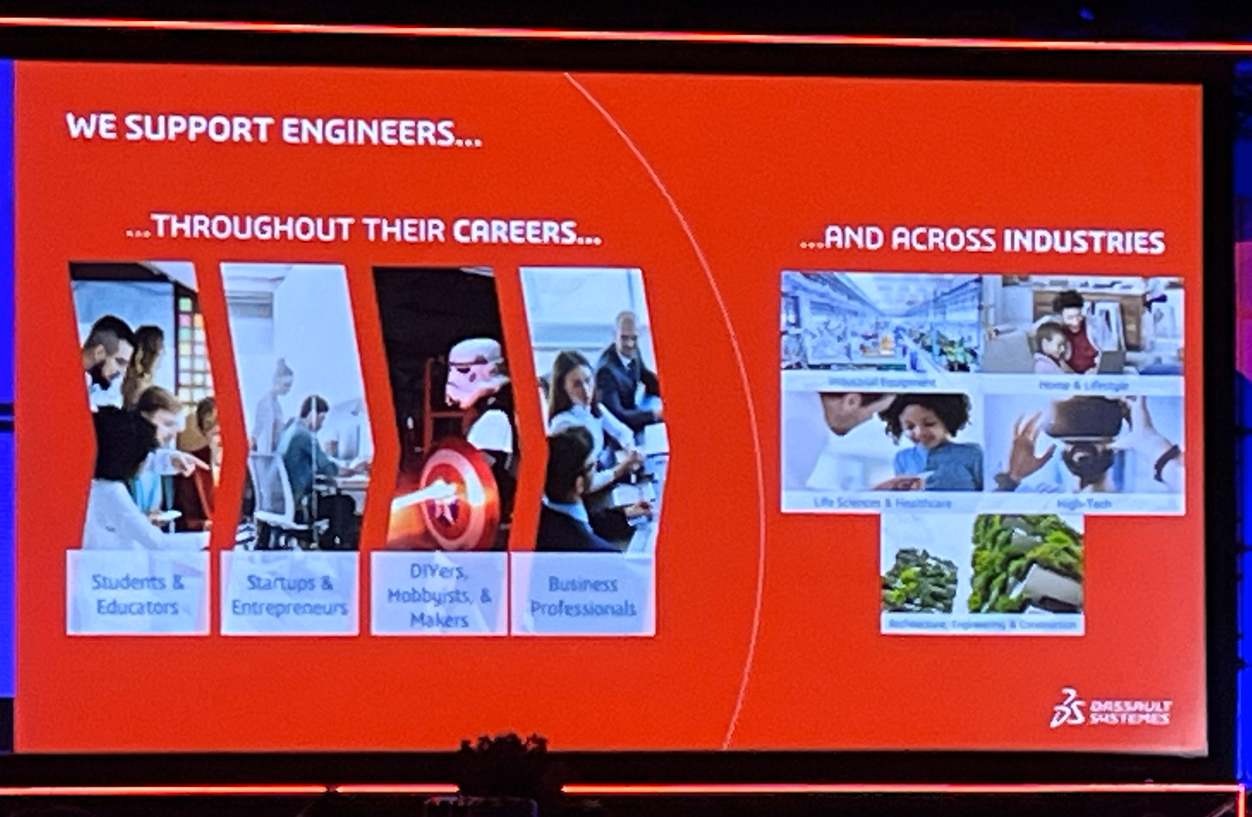
                  3DXWorld 2026 - Day 1

                  Later, attendees heard from Pascal Daloz and Gian Paolo Bassi on how a combination of human creativity and connected technology fuels progress faster than ever. One standout message? “Success shouldn’t be judged by speed alone, but by time to value”, meaning design outcomes that are reliable, meaningful, and innovative.

                  Day One wrapped with a keynote from futurist Pablos Holman, reminding us that the real power of technology lies in solving real world problems, from healthcare to space exploration. His message was forward-looking, inspiring, and grounded in practical impact.

                  Day Two: Engineering Partnerships and AI in Action

                  Day Two turned the spotlight to how industry partnerships and technology collaboration are reshaping the way we work. The session opened with Dassault Systèmes CEO Pascal Daloz discussing how a strong engineering community combined with strategic technology partnerships creates innovation that scales.

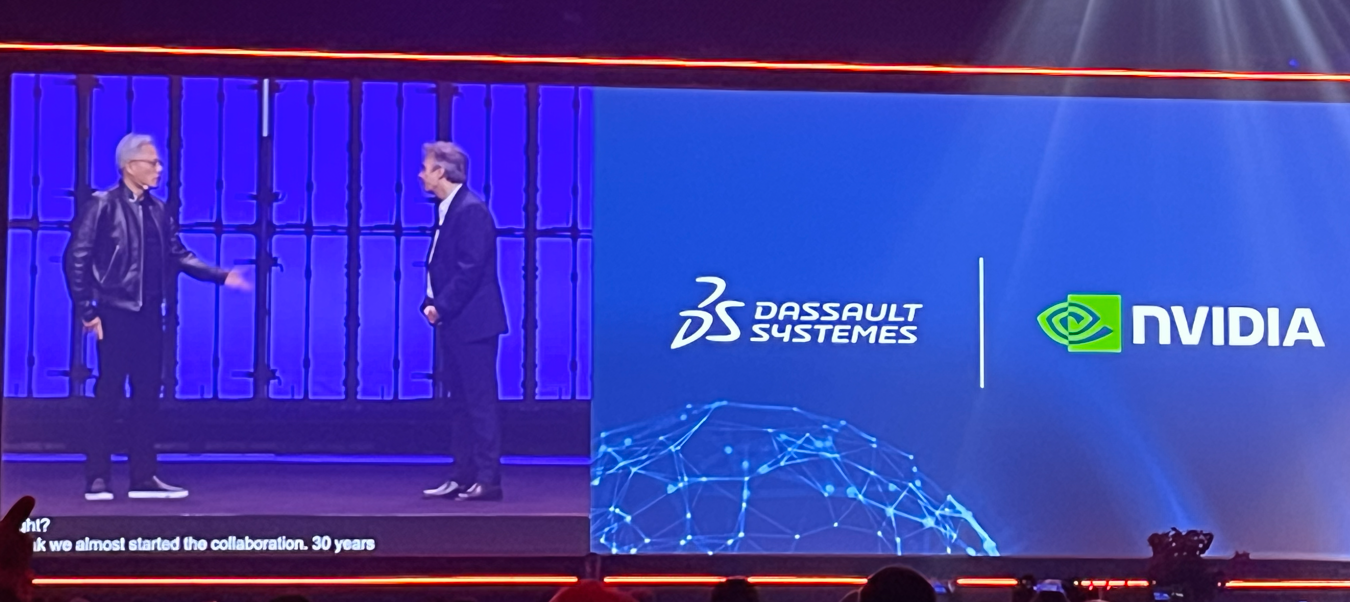
                  We heard from Jensen Huang, Founder and CEO of NVIDIA, about the long-standing collaboration between NVIDIA and Dassault Systèmes. Their work emphasizes science-driven AI and virtual twins, paired with high-performance computing to give engineers tools that can handle truly complex systems in simulation and design at scale.

                  3DXWorld 2026 - Day 2

                  SOLIDWORKS CEO Manish Kumar also joined the stage to outline how AI is being embedded into real design workflows, not as a theory, but as a practical productivity boost. This includes contextual AI tools that help reduce repetitive tasks, free up time for innovation, and bring deeper insight into design decisions.

                  One of the most exciting themes of Day Two was this: “AI isn’t here to replace engineers; it exists to empower them.” By putting smart tools into your hands, you get faster iteration cycles, fewer errors, and a stronger connection between your design intent and your final product.

                  Day Three: Community Celebration and the Next Generation

                  The final day of 3DEXPERIENCE World 2026 was all about community, the people who make this ecosystem special. Whether you’re a seasoned pro, an educator, a student, or a maker, this day celebrated the connections that make innovation possible.

                  Suchit Jain, VP of Strategy and Business Development, kicked things off by highlighting how collaboration across industry, education, and local innovation hubs builds the workforce of tomorrow. There were strong messages about supporting emerging talent, integrating real-world problem solving into education, and making sure SOLIDWORKS continues to be accessible to innovators of all backgrounds.

                  3DXWorld 2026 - Day 3

                  Day Three also spotlighted how regional and global communities are using SOLIDWORKS tools to solve real problems, whether that’s in manufacturing, healthcare, education, or startup growth. It was a reminder that technology only reaches its potential when it’s put to work by passionate people.

                  The final sessions included inspiring competition recaps, community-driven breakout sessions, and previews of what’s coming next, including early looks at SOLIDWORKS 2027 features that continue the theme of smarter workflows and tighter collaboration between design, simulation, and data.

                  What This Means for You

                  Across all three days of 3DEXPERIENCE World 2026, a few themes stood out loud and clear:

                  1. Innovation grows when humans and tools work together.
                    AI companions are here, but they’re companions. They help you work smarter, not replace your expertise. AND the best part, they come with SOLIDWORKS with Cloud Services.

                  2. Connected ecosystems :  partnerships + community to accelerate progress.
                    Whether it’s NVIDIA, startups, educators, or global manufacturers, connection drives insight at scale.

                  3. The next generation of designers is in focus.
                    Programs, hubs, and community efforts are investing in future creators, ensuring SOLIDWORKS tools remain integral to how engineering gets done in the years ahead.

                  3DEXPERIENCE World 2026 wasn’t just a conference, it was a reminder of why we design, why we connect, and why we build communities around shared purpose, problem solving, and progress.

                  We’re already looking forward to 3DEXPERIENCE World 2027!

                  3DX World 2027 - Save the date

                  If you want to know more about how SOLIDWORKS users can begin to leverage AI in 2026, call us, or visit at 2650 Avenue Marie-Curie, QC.


                  Michael Habrich

                  3DEXPERIENCE Specialist

                  X_green_halo

                  Any questions? Need help? Ask one of our experts.

                  Whether you’re ready to get started or just have a few more questions, you can contact us toll-free:
                      Download

                        Download

                          Download